Blog

  • Open-Source Chess Pieces for Everyone

    Open-Source Chess Pieces for Everyone

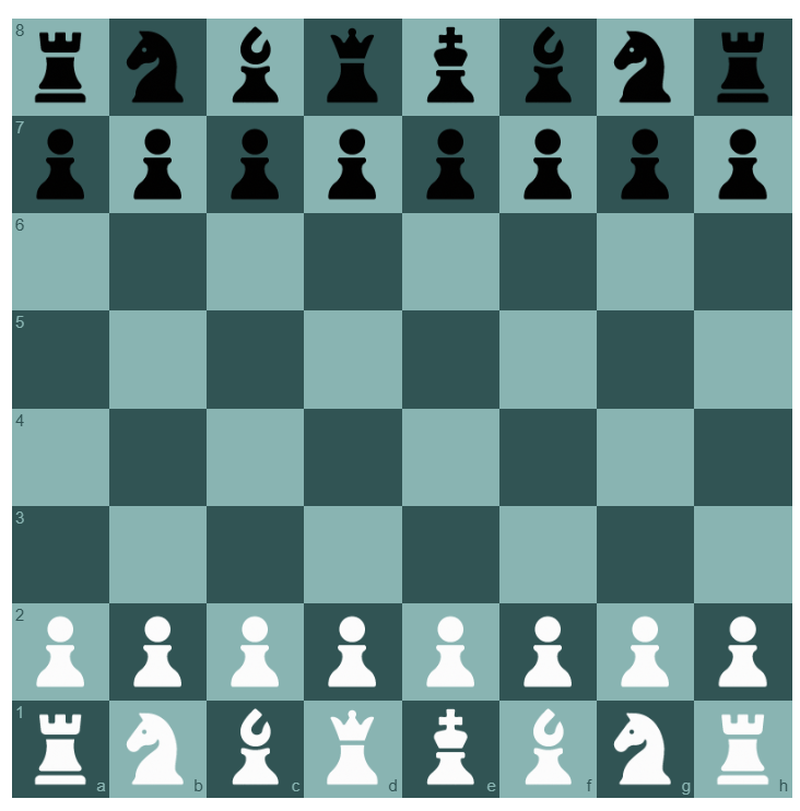
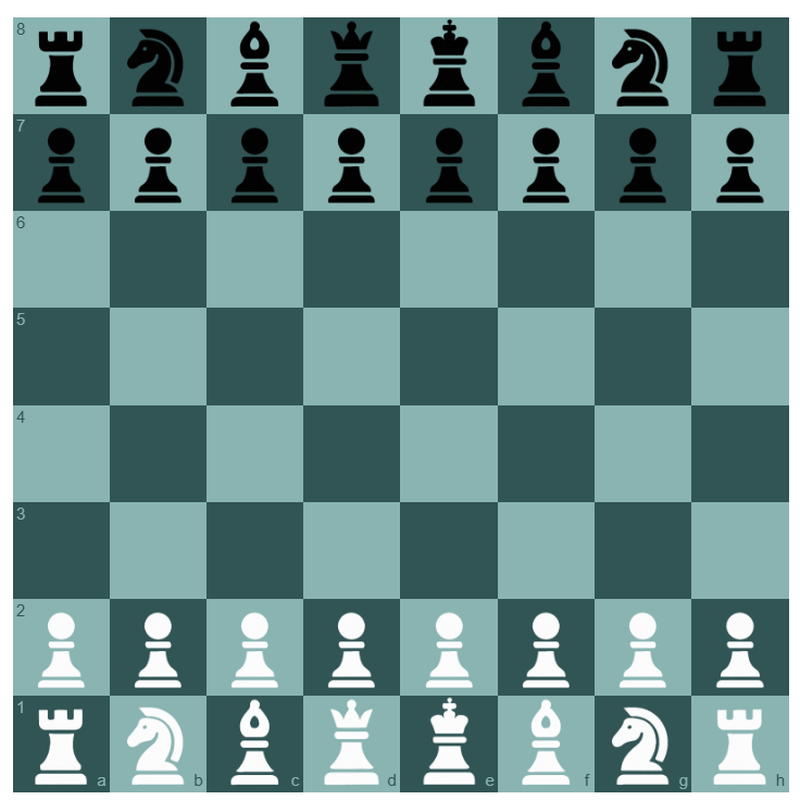
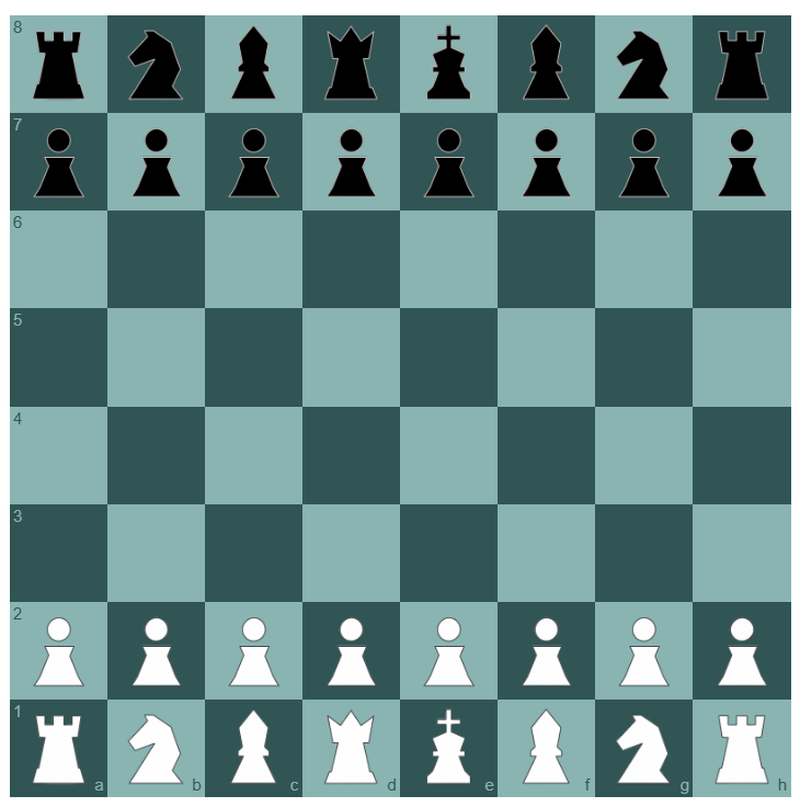
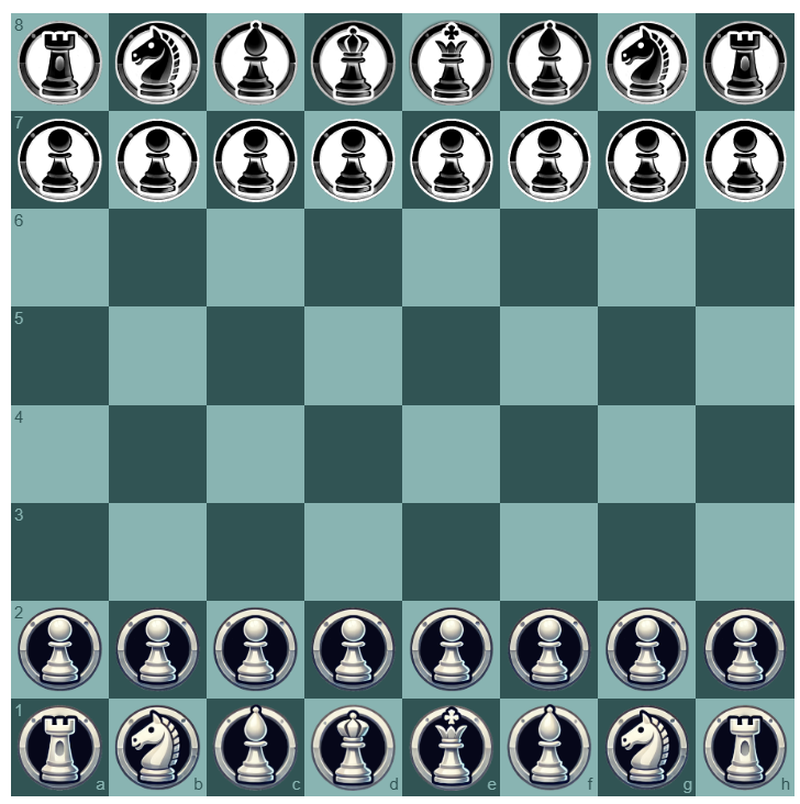
    Free, open-source chess piece icons for developers and creators

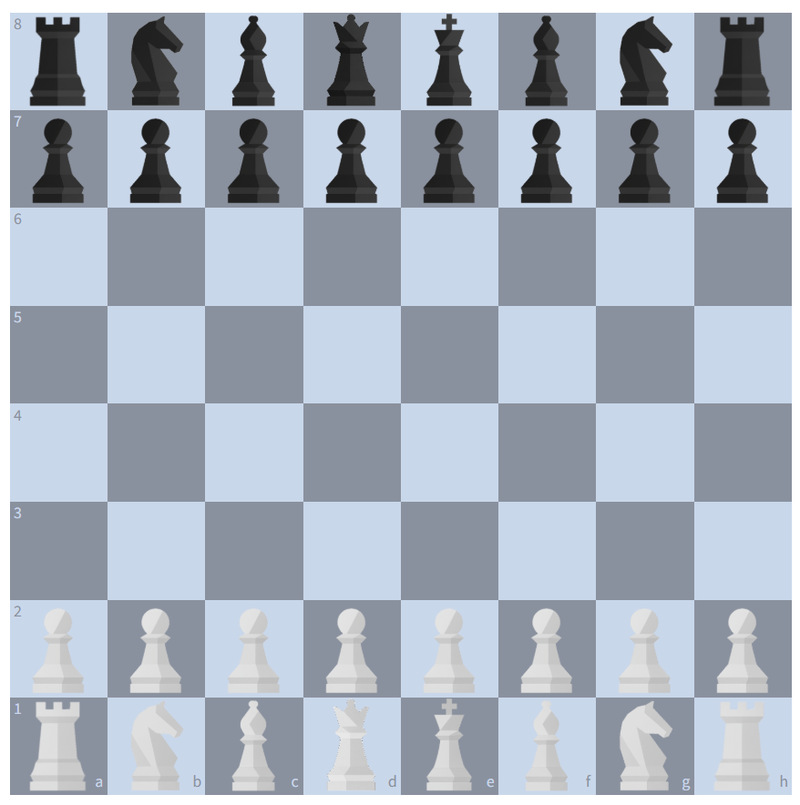
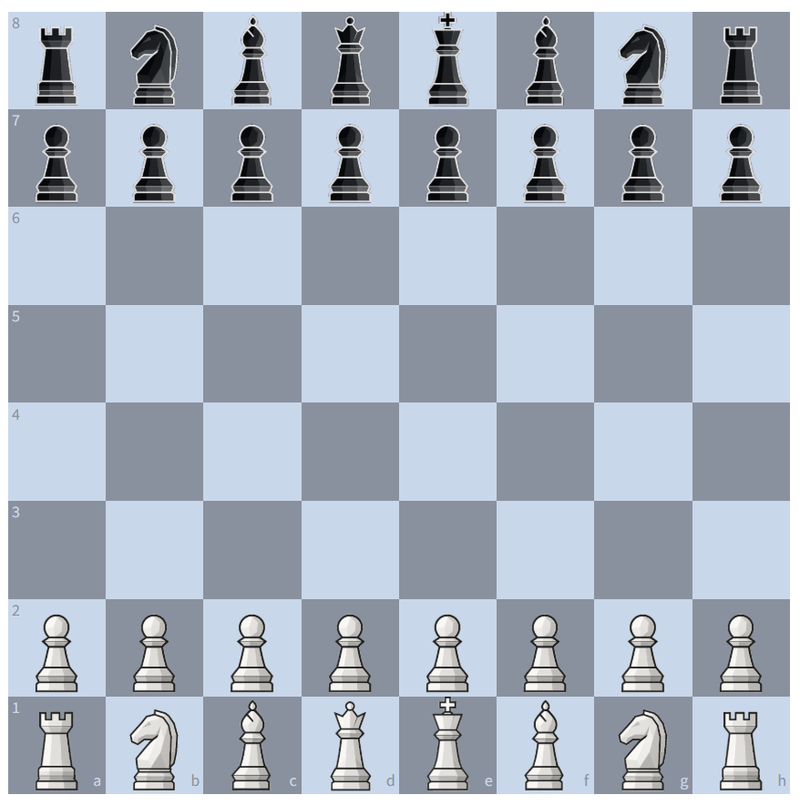
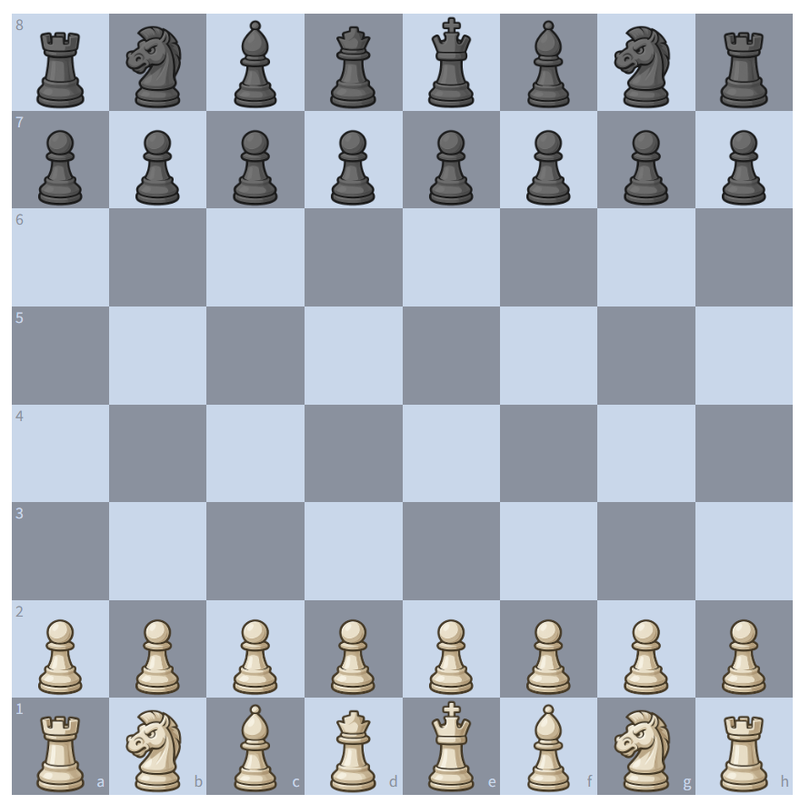
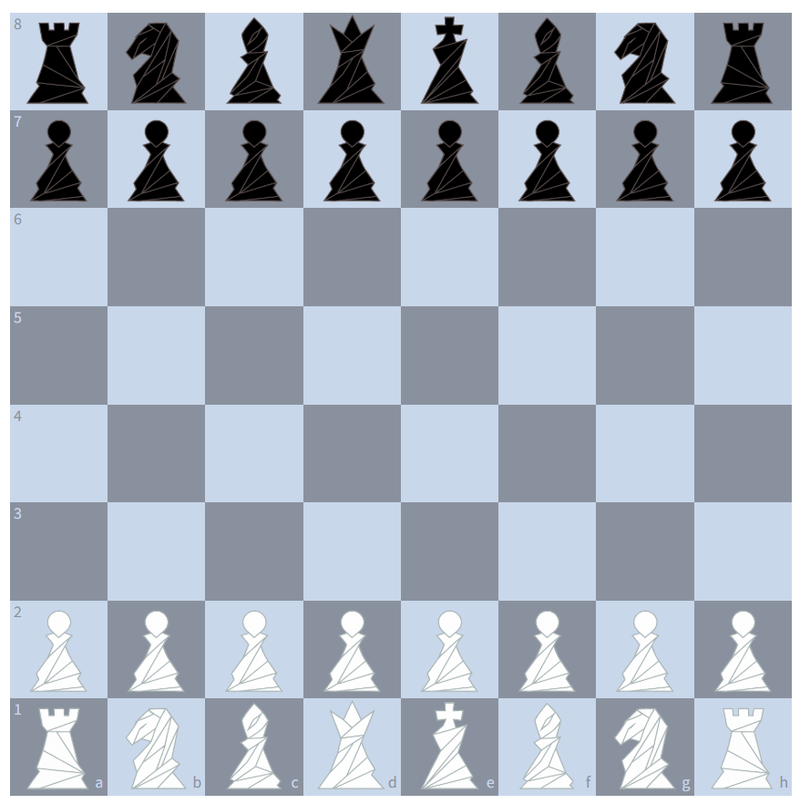
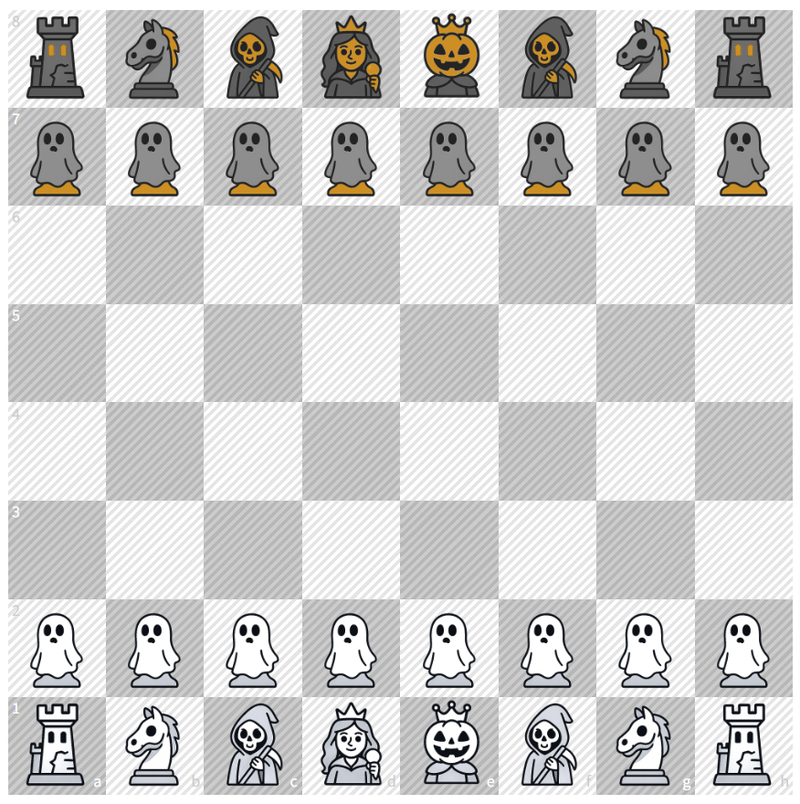
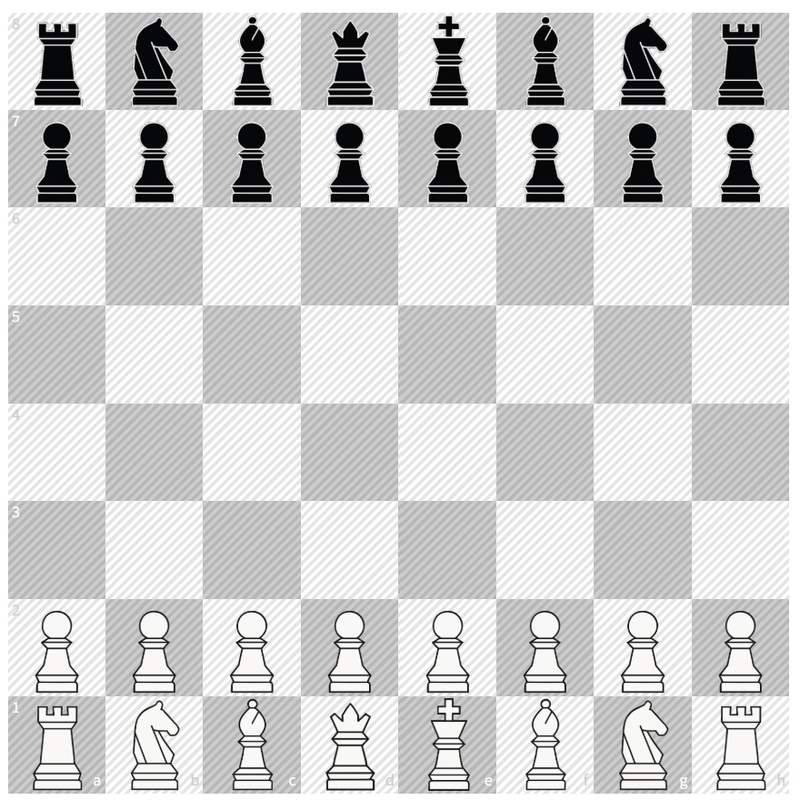
    I couldn’t find many 100% free-to-use chess piece sets, so I decided to create some for my own chess platform. While doing so, I thought — why keep them to myself? Others might find them useful too.
    So I’m sharing them here with an MIT license, meaning they are completely free for you to use, remix, or build on in your own projects.
    Link: https://github.com/HollowLeaf1981/ChessPieces

    Note: I’m not a graphic designer, but I’ll be looking into making the SVGs as small and efficient as possible. In the meantime, I still wanted to share these with you all.

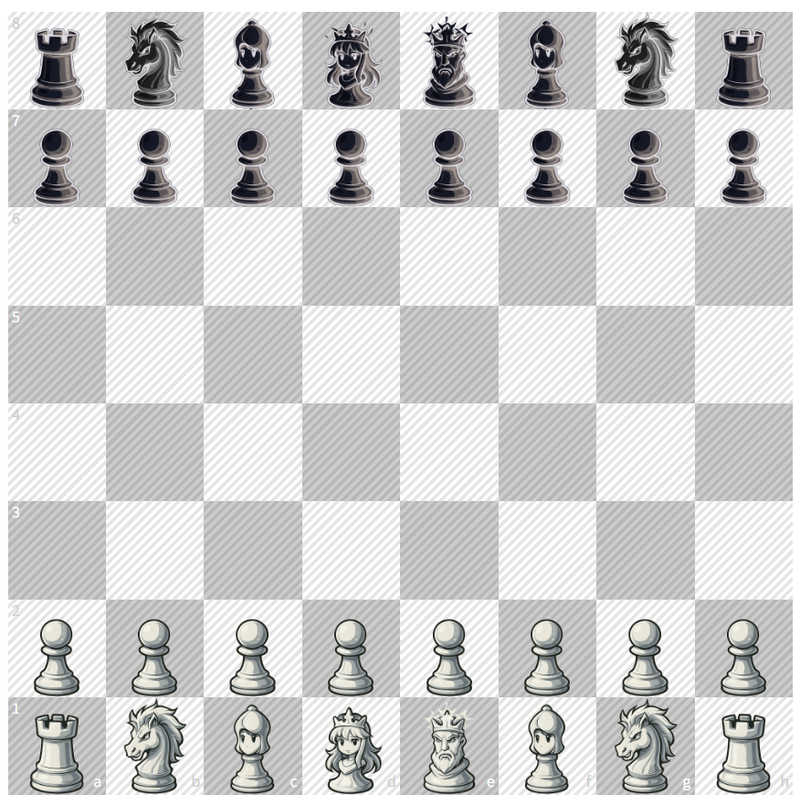
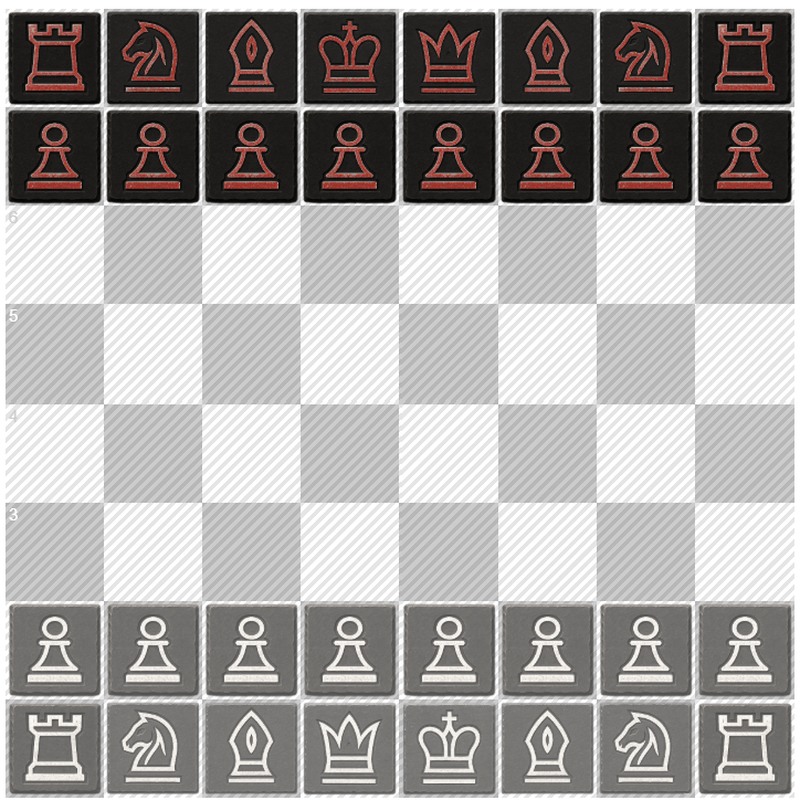
    Anime
    image.png
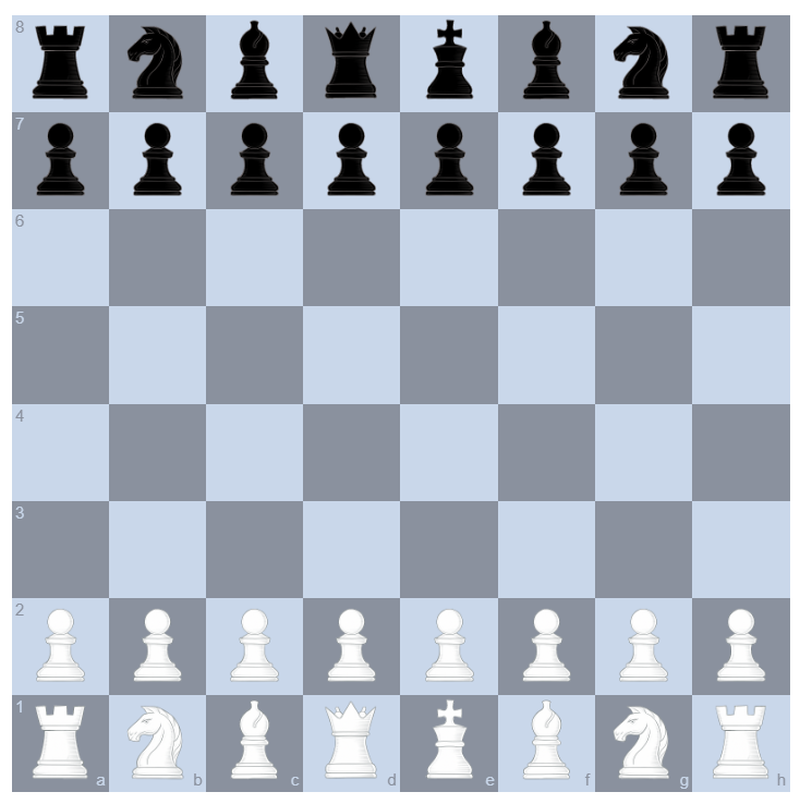
    Apollo
    image.png
    Artemis
    image.png
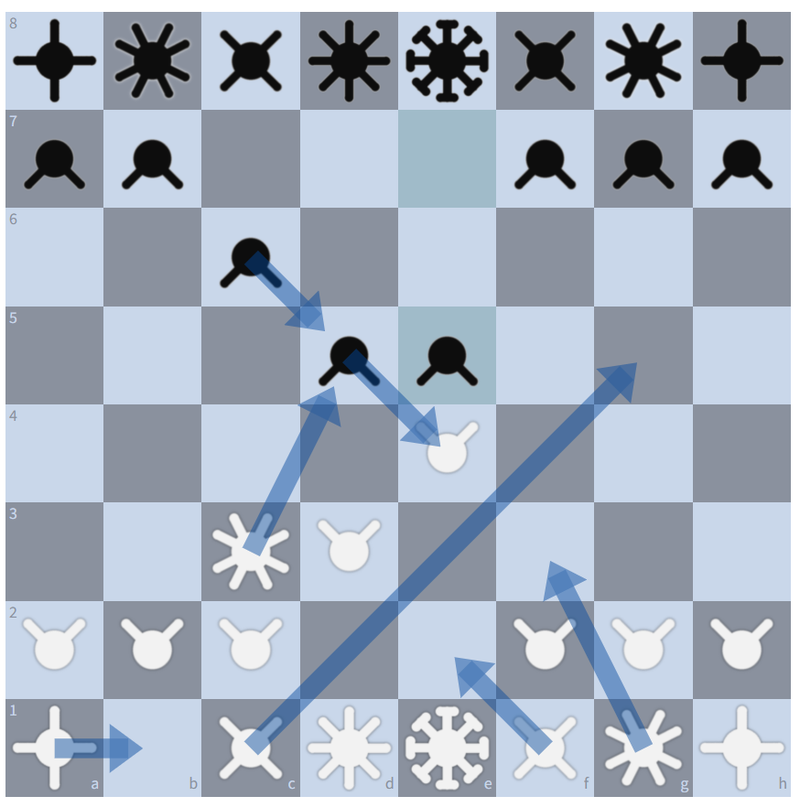
    Attack (Based on the pieces attack vectors)
    image.png
    Clash
    image.png
    Hades
    image.png
    Halloween
    image.png
    Hera
    image.png
    Juno
    image.png
    Jupiter
    image.png
    Mars (I personally love this one)
    image.png
    Minerva
    image.png
    Stone
    image.png
    Venus
    image.png
    That’s it for now!
    So… which set do you love and which one do you totally hate? Some are fun, some are stupid, and some are useless, but hey… why not…
    Let me know in the comments — I’m really curious to see what everyone thinks.

  • Building Chess Solitaire

    Building Chess Solitaire

    Exploring the design, analysis, and results behind my latest chess application

    I’m always on the lookout for fresh chess application ideas. Over time, I’ve built more than 50 different tools (51 and counting!) and I’ve set myself a symbolic goal of reaching 64 — one for every square on the board. Recently, someone in the community (shoutout to mattchess) asked if I had ever thought about building a Chess Solitaire game. Honestly, I had no idea what that was at first, but the concept immediately caught my attention once it was explained.
    At first, I planned to just add it to my ever-growing backlog of “someday projects.” But then I found myself with a few free evenings and thought — why not give it a shot?
    In this blog, I’ll walk you through my thought process, from the initial design stage to getting a working version of the game up and running.

    If you just want to see the application: Try Now

    Note: This build is currently live on my test site, not yet on the main site. I like to experiment and gather feedback before rolling features out more broadly. So if you have any feedback, do let me know in the comments or on Discord

    What is Chess Solitaire?

    The idea behind Chess Solitaire is simple but surprisingly powerful. The goal is to replay a real game — usually from a strong master, a famous clash, or a historic encounter — and try to guess the moves as if you were the one sitting at the board.
    Of course, you could just open up a PGN and click through the moves by yourself. That’s why it’s called “solitaire” — it’s essentially a solo training exercise. But the twist is that after every move you play, the system gives you immediate feedback. If you chose the same move as the master, it’s marked as a match, and if you went off track, you’ll know right away.
    The purpose of the exercise is two-fold. First, it gives you the chance to walk through and reflect on an instructive game, taking the time to understand each decision. Second, it challenges you to see how closely your thought process aligns with that of a grandmaster. In that sense, it becomes both a study tool and a fun test of your chess instincts.

    Application Design

    When I first sat down to think about how to build Chess Solitaire, my initial question was simple: what components would this actually need? At the very least, it would require an interactive chessboard where moves could be played, a PGN card to display the notation, some form of analysis during the game, and finally, a review system once the game ended.
    From there, the flow began to take shape. The idea was that you could either load a PGN directly or choose a random game from a built-in collection — I decided to leverage my archive of every World Championship game for this. Once a game is loaded, you can start playing through it on the board. As you make moves, the PGN card updates in real time, and beneath it, in-game analysis shows how your choices compare to the original moves.
    I also wanted to give players some flexibility with the controls. You can set how many attempts you want per move, which changes the difficulty depending on how strict you want the experience to be. You can also choose which side you’re playing — White, Black, or both — so the game can adapt to whatever training focus you have in mind.
    You can keep going until you reach the end of the game naturally, or hit an “End Game” button to jump straight to the review phase. The review itself offers a fuller picture of your performance: which moves you matched, where you went wrong, and whether your alternatives were still reasonable. In some cases, your move might even be an improvement over the grandmaster’s choice — was it a book move, a hidden resource, or simply stronger according to the engine?
    In the end, the workflow I had in mind was deliberately simple. Load a game, play through it as best you can, and then see the outcome laid out clearly in the review. Simple to follow, but rich enough to make the experience both a learning tool and an enjoyable test of skill.

    Note: Whenever I start a new application, I never jump straight into code. Instead, I begin with pen and paper, sketching out the layout and flow I have in mind. I’ll iterate a few times, refining the look and structure until I’m happy with it. Only then do I translate that design into actual code. This step saves me a lot of rework later and helps me stay clear on what I’m trying to build.

    Tech Stack

    For those interested in the nuts and bolts, the Chess Solitaire application is built with a lightweight and straightforward stack:

    • React.js — powering the UI, component state, and overall application structure.
    • React Chessboard — for the interactive chessboard, move input, and piece rendering.
    • Stockfish.js — running chess engine analysis directly in the browser, with a worker pool for fast and parallel evaluations.
    • Plain JavaScript utilities — additional helper functions and lightweight modules to tie everything together.

    I deliberately kept the stack minimal. By avoiding heavy frameworks or unnecessary dependencies, I could focus on performance, responsiveness, and building the exact features I wanted without bloat.
    If you’d like to dive deeper into how to build your own Chess Web Application from scratch, I’ve written a dedicated series that walks you through the fundamentals — from setting up a React project to integrating a chessboard and handling PGN data. You can check it out here:

    Running Analysis

    This was by far the most challenging part of building Chess Solitaire. The analysis needed to feel quick and responsive — ideally instant during the game — and the post-game review had to generate results in seconds, not minutes. That immediately raised the question: how do you achieve this level of speed without overwhelming the system?
    For the engine, I chose to leverage Stockfish 17.1 Lite.js, which I already use across many of my other applications. It’s freely available, reliable, and lightweight enough to run in the browser. The tricky part wasn’t running Stockfish itself, but doing so efficiently. Imagine a situation where the player has unlimited guesses on a single move. If they tried twenty different moves and each one was evaluated at depth 15, that would mean running the engine twenty times in sequence. The feedback would be far too slow — the complete opposite of what I wanted.
    To solve this, I created a pool of Stockfish workers. Instead of a single engine instance, I spun up eight in parallel. That way, multiple moves could be evaluated simultaneously, and feedback would arrive quickly enough to feel immediate. On most computers, this setup reaches depth 15 for all the moves almost instantly, which makes the in-game experience smooth and responsive.
    The same approach worked for the post-game analysis. Once the game ends, I could send batches of positions to the worker pool and process them in parallel, giving the user a complete review of the entire game in just a few seconds. This part required a little extra care, though. The post-game review involved a two-pass system: first, attach Stockfish evaluations (as well as the principal variations for later comparison) to every move and every guess the player made; second, go back through those results and assign annotations. This ensured that when you navigate through the finished game, it’s clear not only whether you matched the grandmaster’s move, but also how your alternative compared — was it still playable, was it book theory, or did you somehow stumble on an improvement?
    Getting this analysis pipeline running smoothly was the hardest technical challenge. Between synchronization issues, potential memory issues, and the complexity of managing multiple engine instances, this was the part where I suspect many hobbyist developers would get stuck. Once I solved it, though, the rest of the application became a matter of building out the components and fine-tuning the workflow to deliver the desired user experience.

    Note: One of the most important aspects of building chess applications that work with PGNs is deciding how to store the data. A raw PGN string might be fine for display, but it’s not effective for analysis or interaction. For Chess Solitaire, I structured the data as a moves array with parent–child relationships. This allowed me to traverse the entire move tree easily, while still being able to process each move individually and attach attributes such as evaluations, annotations, and user attempts.

    Results

    Once the game is finished, the experience shifts from playing to reflecting. The Results phase is where everything comes together: you can see how well you matched the original game, where you went astray, and how your alternatives stacked up against the master’s moves.
    The review isn’t just a list of right and wrong decisions. Each move is annotated based on Stockfish’s evaluation and a comparison with the actual game. If you matched the grandmaster, it’s marked clearly. If you chose something different, the system checks whether your move was still sound — was it a book move, a playable alternative, or even an improvement? In some cases, you’ll discover that your idea wasn’t so bad after all, and in rare cases, you might even “outplay” the original.
    The results also provide an overall snapshot of your performance: how many moves were perfect matches, how many needed retries, and how many you missed entirely. This summary gives the exercise a sense of closure, but more importantly, it offers insight into your thinking process and areas for improvement.
    For me, this was the part that made the game feel complete. The in-game feedback keeps you engaged move by move, but the results screen is what makes the whole exercise valuable as a training tool. It’s here that you can step back, see the bigger picture, and measure how closely you managed to “think like a grandmaster.”

    Note (for the nerds): For categorizing moves, I didn’t want to just say “right” or “wrong” — I wanted to give proper chess-style annotations based on the difference between the engine’s best move and the player’s move. Using Stockfish’s evaluation as the baseline, here’s the logic I used:

    • If the move matches the engine’s best move *
    • If it’s within 0.25 pawns of the best !
    • If the difference is > 0.25 ?! (inaccuracy)
    • If the difference is > 0.75 ? (mistake)
    • If the difference is > 1.5 ?? (blunder)

    These thresholds are, of course, arbitrary. They’re not official or universally accepted cutoffs, but I found them to be a practical balance between being too strict and too lenient. The goal wasn’t to replicate a grandmaster coach’s intuition perfectly, but to provide clear, useful feedback that makes the post-game review more engaging and instructive.

    Summary

    Building Chess Solitaire turned out to be one of those projects that looks simple on the surface but hides a lot of interesting challenges under the hood. At its core, the idea is straightforward: load up a master game, try to play through it move by move, and get feedback along the way. But to make it truly engaging, I had to think carefully about design, responsiveness, and the overall flow from start to finish.
    The design phase was about keeping things simple and intuitive: an interactive board, a PGN card, in-game feedback, and a clear results screen. Running analysis was the hardest technical hurdle — managing Stockfish in a way that felt instant and scalable required worker pools, parallel processing, and a two-pass review system. The results screen brought it all together, turning the exercise into both a training tool and a fun challenge.
    For me, Chess Solitaire fits nicely into the larger theme of the applications I’ve been building: tools that combine serious chess training value with a sense of play. It’s a chance to step into the shoes of a grandmaster, even if just for one game, and measure how close your thought process comes to theirs.

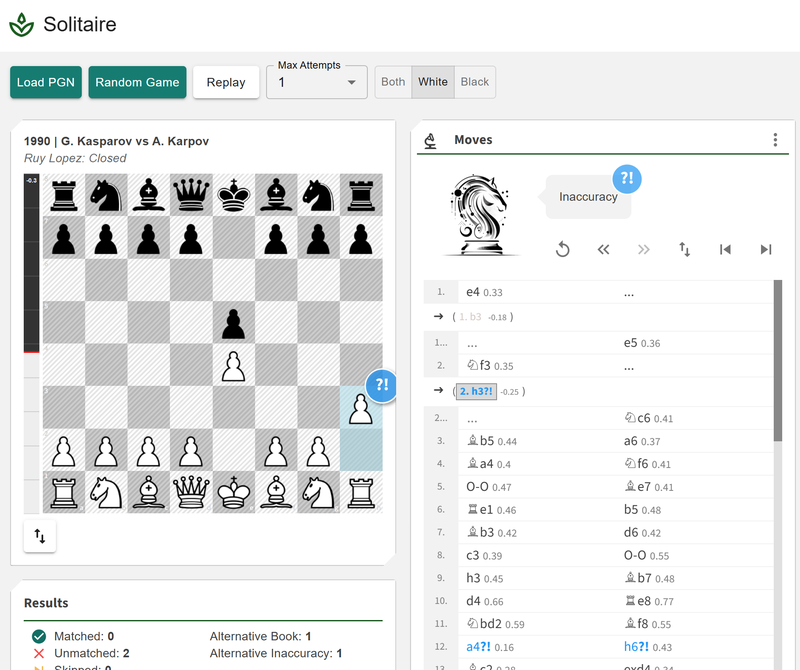
    And here is the result… after around 12 hours of building, testing, and tweaking, this is what I ended up with.

    image.png

    Note: Having built a large number of chess applications already, I’ve accumulated an extensive library of reusable components — boards, PGN parsers, analysis panels, result cards, and more. This made the development process much smoother, since I could leverage pieces I’d already refined in earlier projects. One of the joys of building a lot of chess tools is that each new project benefits from the groundwork of the previous ones.

    Note: One of the most important aspects of building any application is to get feedback, and the community supporting me is awesome in giving me suggestions and tweaks. Big shout out to Mattchess and FRahde for their support in this application.

    Try it out yourself and see how closely you can follow a grandmaster’s moves. Try Now
    Building chess applications is both fun and rewarding. If you’re working on your own chess project and have questions — technical or design-related — feel free to reach out. I’m always happy to talk shop and share ideas.

  • New Free Game Review Tool

    New Free Game Review Tool

    Because Why Not?

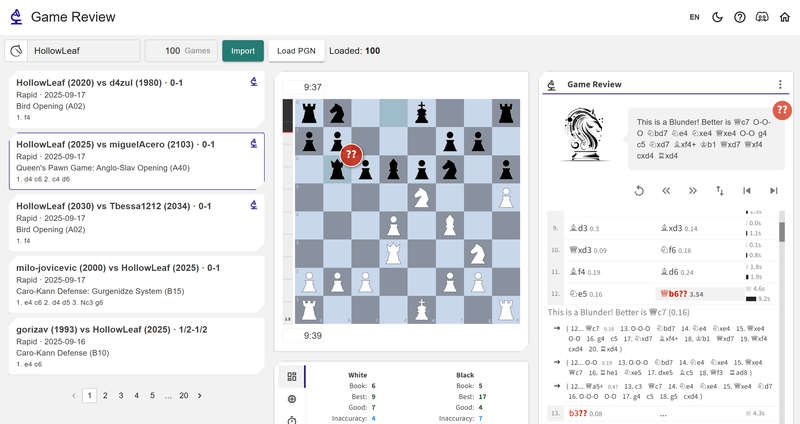
    Building a Chess Game Review app was always on my bucket list. I had a some free time, so I thought, “why not now?” A few evenings later, I had something up and running — simple, free, and actually pretty fun to use.
    image.png
    At the moment, you can:

    • Import games straight from Chess.com or Lichess, or just paste a PGN,
    • Click on a game to request analysis,
    • The Game Review tags your moves (book, good, best, etc.), shows an engine chart, time usage stats, accuracy,
    • Features a replay window where you can spot missed lines and laugh at your blunders,
    • It’s powered by Stockfish 17 Lite at depth 12.

    For those who like the details: move categories are based on how far you were from the best move —

    • 0.25–0.75 = Inaccuracy
    • 0.75–1.5 = Mistake
    • 1.5+ = Blunder

    The whole point isn’t to be heavy or professional — just a quick, lightweight way to peek at your games and get some insight without overthinking it.
    Give it a try on my test site and let me know what you think! Try Now

  • Repertoire Builder v1.1 is Live + Chessboard Magic Updates

    Repertoire Builder v1.1 is Live + Chessboard Magic Updates

    “Play the opening like a book, the middle game like a magician, and the endgame like a machine.” — Rudolph Spielmann

    It’s here! Version 1.1 of Repertoire Builder is live and packed with new features. The platform has now grown to over 3,300 users, who’ve collectively added more than 1 million moves across 7,000+ repertoires. It’s been incredible to see the growth, and this release adds even more tools to help you train smarter.

    It’s free to get started with the Repertoire Builder, so you can jump in and begin building your repertoire today. Get started with Repertoire Builder

    If you have any questions Join the community on Discord

    What’s New in v1.1

    Puzzle Module

    image.png

    Sharpen your memory and understanding with creative drills.
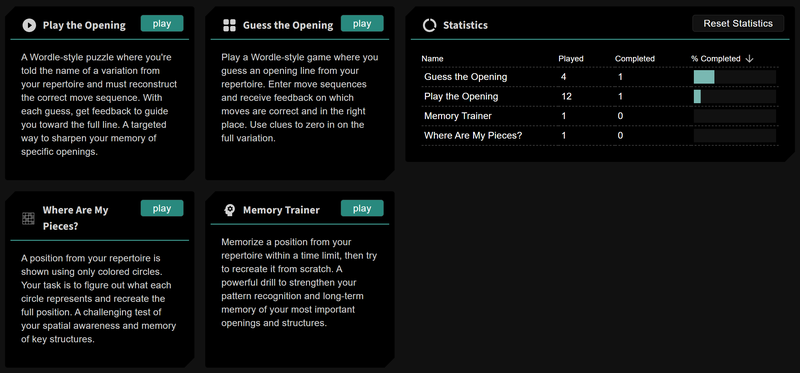
    The new Puzzle Module is designed to challenge your repertoire knowledge in fresh ways:

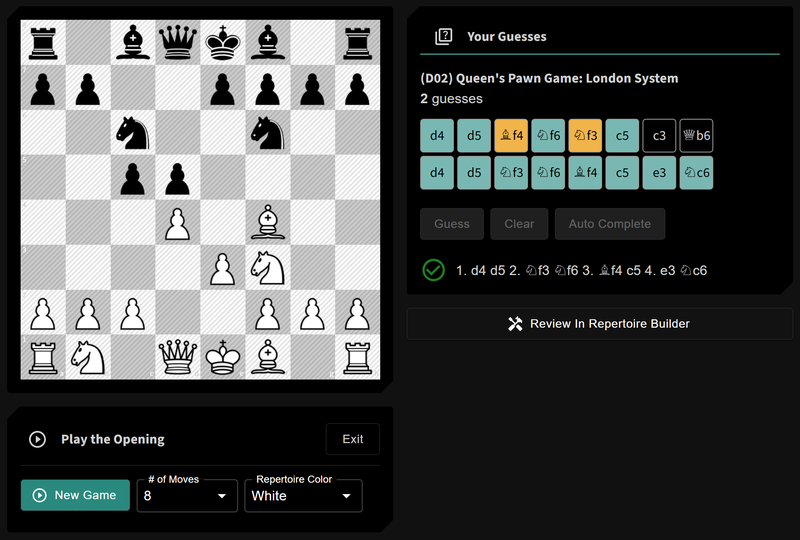
    • Play the Opening – get a variation name from your repertoire and see if you can play it correctly.
    image.png
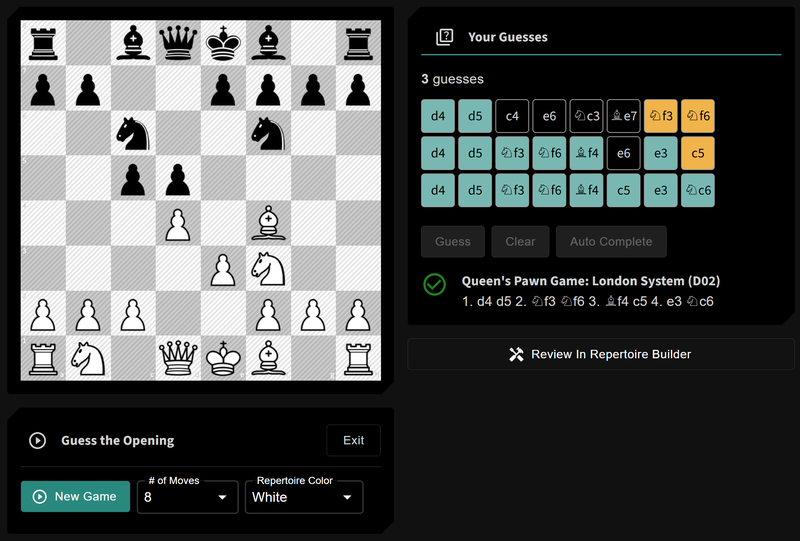
    • Guess the Opening – a Wordle-style twist for chess lines, drawn from your repertoire.
    image.png
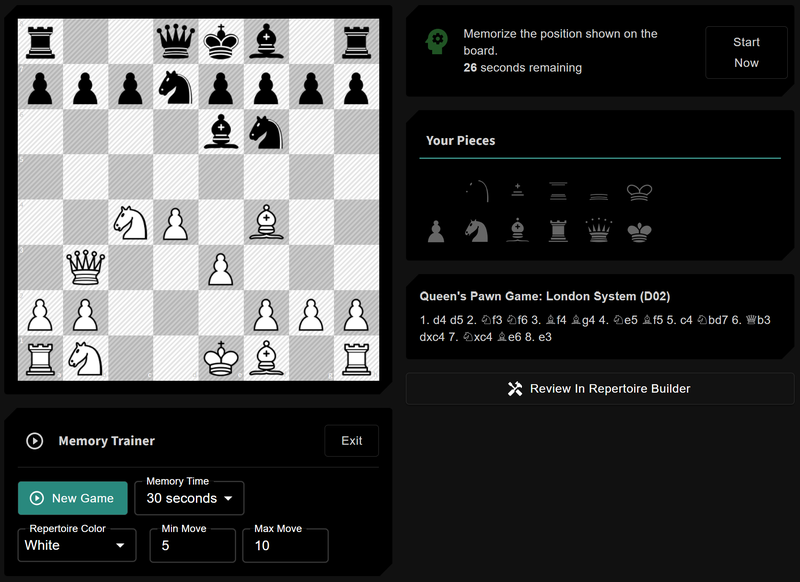
    • Memory Trainer – memorize a position in seconds, then rebuild it from scratch.
    image.png
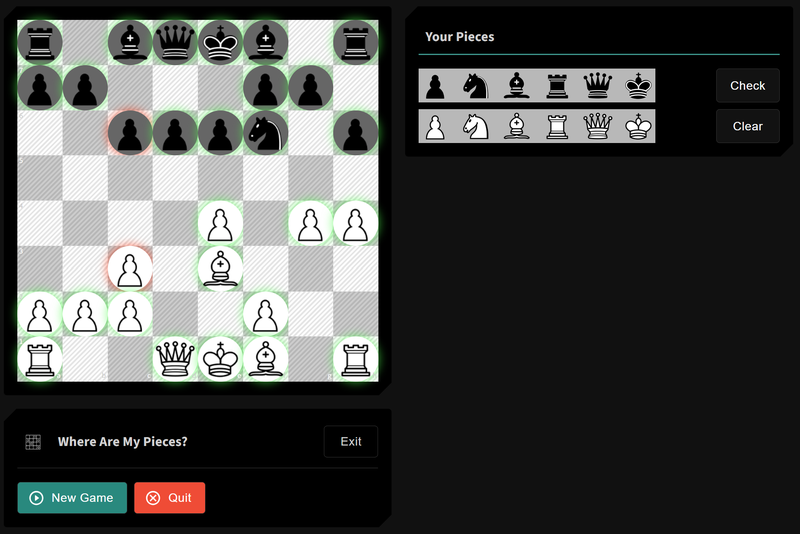
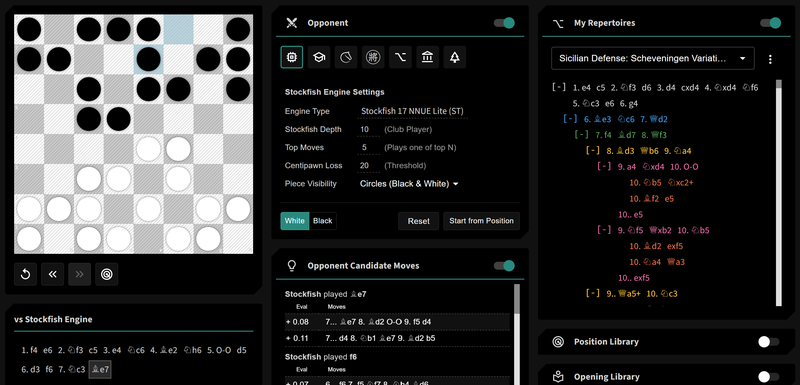
    • Where Are My Pieces? – a visual recall test: your position is shown as plain white and black circles, and you need to identify what piece belongs where. A surprisingly fun way to sharpen memory and visualization.
    image.png

    Local Engine Integration

    Unlock powerful analysis with your own engine.
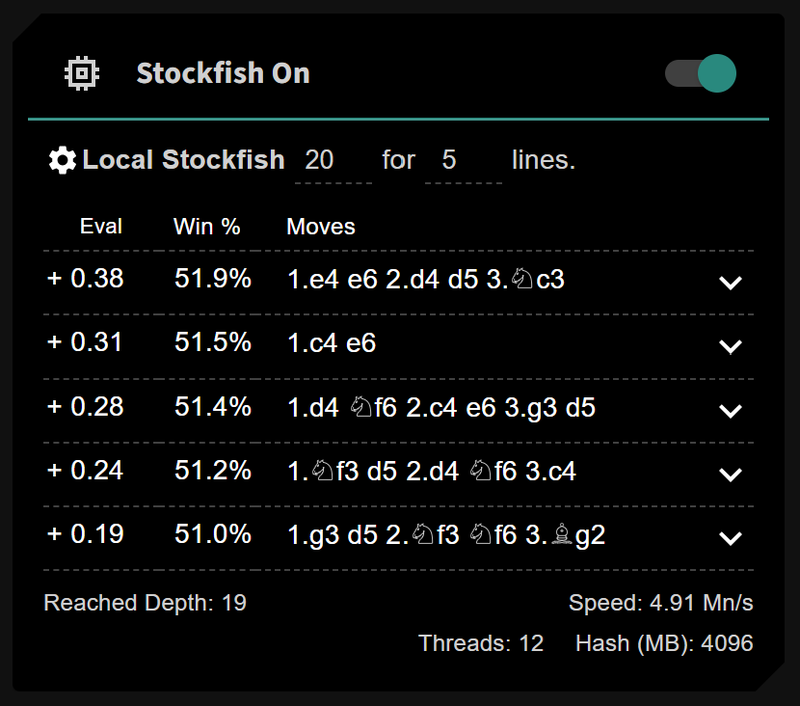
    With Local Engine Integration, you can now power your training using your own UCI engine. Tested with Stockfish (15–17)Komodo Free, and Berserk, this feature lets you run stronger or custom analysis directly inside Repertoire Builder. All you need is a small proxy app to connect the two.
    image.png
    Note: Engine Evaluations are now also Cached so you can toggle between moves and not have to regenerate the engine from the start.

    A proxy server needs to be running so that the website can communicate with your desktop computer. https://github.com/HollowLeaf1981/CBMEngineProxy

    Candidate Move Trainer

    image.png

    Test your understanding, not just your memory.
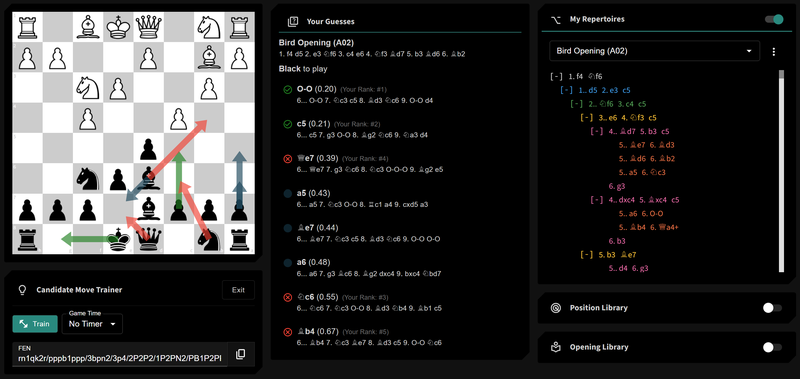
    The new Candidate Move Trainer lets you pick a position—either from your repertoire or one you’ve created manually—and test yourself by finding the best candidate moves. It’s a great way to move beyond rote memorization and deepen your true understanding of a position.

    Positions Card

    Save and reuse positions across the platform.
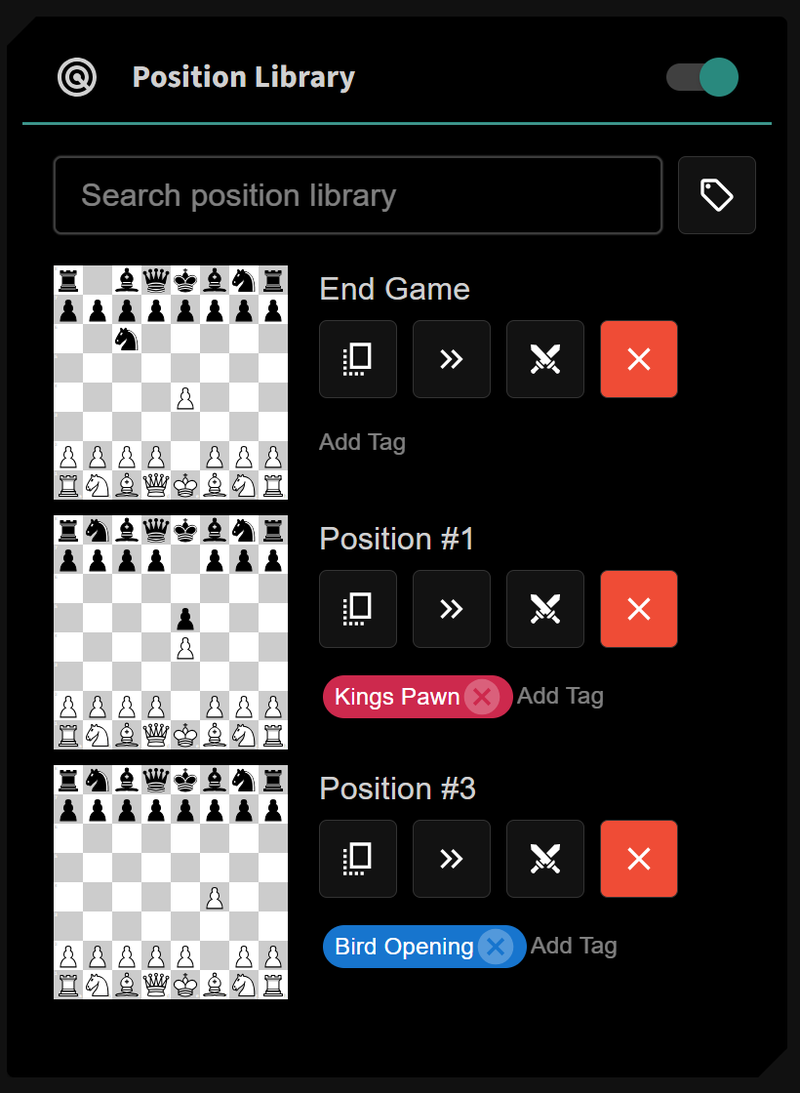
    The new Positions Card makes it easy to save positions for later—perfect for a tricky middlegame you want to revisit. Saved positions can be launched straight into Practice or the Candidate Move Trainer, or stored for review when you have time.
    image.png

    Position Overview Card

    See all your moves in one place.
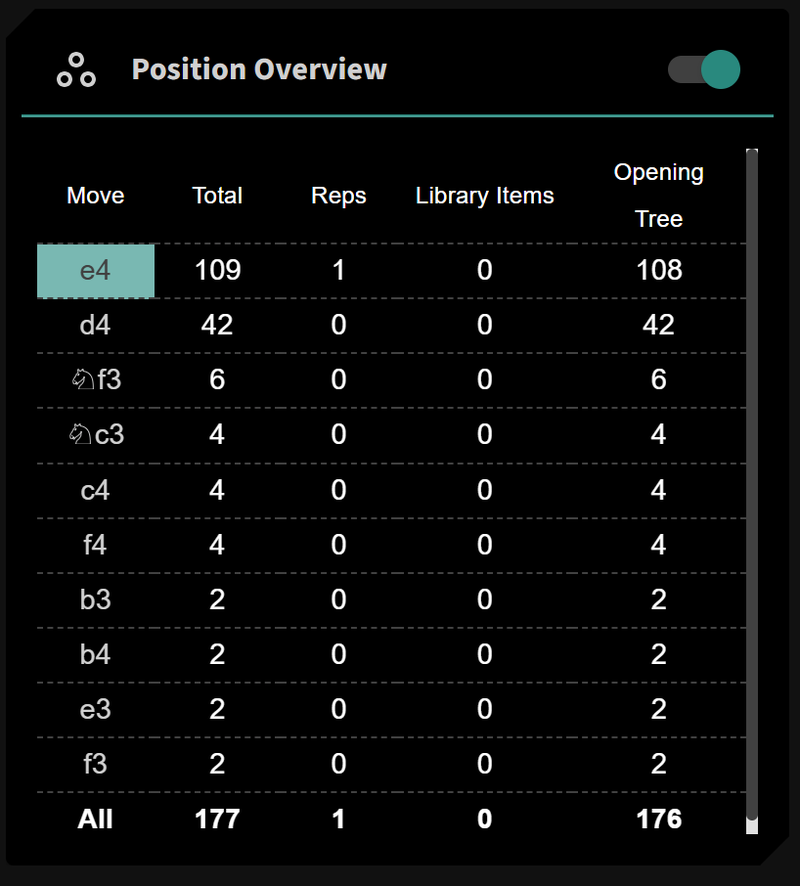
    We’ve added a brand-new Position Overview Card that brings together everything you need to understand a position at a glance. Instead of jumping between the Opening Tree, your Repertoires, and your Library, this card consolidates the data into a clean and compact table.
    For any position on the board, you’ll instantly see:

    • Move – the candidate moves available.
    • Total – the overall number of times each move appears across all sources.
    • Reps – how often that move occurs in your own repertoires.
    • Library Items – how often it appears in your imported games and studies.
    • Opening Tree – the number of times it has been played in the wider opening database.

    This makes it easier than ever to compare your preparation against the theory and your personal practice. You can click on a move to add it directly to your lines, speeding up your workflow and making study more interactive.
    The Position Overview Card is designed to be compact, efficient, and fast, so you can focus on learning the moves that matter most.
    image.png

    Practice Module Improvements

    Train smarter with more control and new modes.
    The Practice Module has been upgraded with more flexibility and variety:

    • CPL thresholds let you tune Stockfish and ChessDB opponents, making them sharper or looser depending on what you want to train.
    • Practice blindfold chess: swap pieces for circles or make them invisible to push your visualization skills.
    • Seamless integration with Positions and the Opening Library, so you can start training from wherever you like
    image.png

    Other Updates

    • Improved injection of Master Games into repertoires and library items.
    • A new Usage Card so you can track limits and growth.
    • Library upgrades: bulk tagging, easier deletion, smoother management.
    • Chessboard Sounds – 4 options now available, with more on the way.
    • General performance enhancements, hundreds of interface tweaks and bug fixes.

    Chessboard Magic Updates

    Alongside the major new features, we’ve also expanded our standalone training tools:

    • (45) Practice Trainer – practice against a variety of sources as an independent tool, without needing to enter the full Repertoire Builder.
    • (46) Candidate Move Trainer – now available as its own module, so you can sharpen your move-spotting skills anytime.
    • (47) Opening Tree – explore openings with a dedicated standalone tool, complete with engine cards borrowed from the Repertoire Builder for deeper analysis.

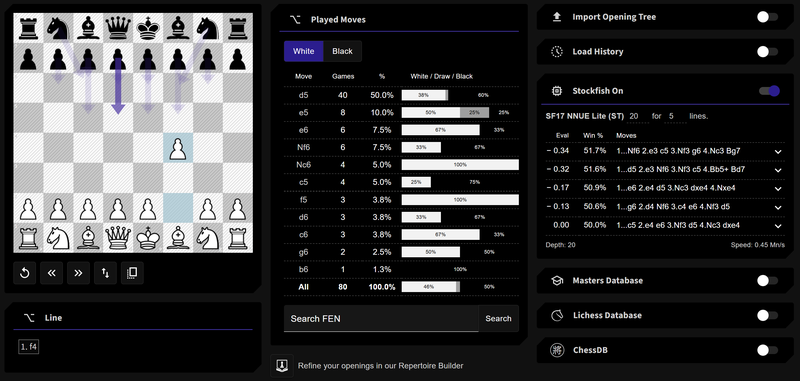
    image.png
    I’ve still got 17 more applications to build before Chessboard Magic reaches my personal goal of 64 chess related games and tools — and I’m excited for the journey ahead.

    Coming Soon

    The journey doesn’t stop here—v1.1 is just the beginning. Here’s a look at what’s next for Repertoire Builder:

    Customizable Layouts

    Soon you’ll be able to design Repertoire Builder around the way you work best. Enable only the cards you want, resize them, and move them to suit your workflow. Even better—you’ll be able to save multiple layouts, so you can quickly switch between different setups for study, training, or preparation.

    Upgraded Training Module

    The Training Module is about to get a major boost. It already offers powerful ways to sharpen your skills, but we’re enhancing it with more training options and deeper integration into Repertoire Builder. This expansion will make the Training Module an even more versatile tool for learning, practicing, and reinforcing your repertoire.

    Additional Puzzles

    I’m adding a new set of standard puzzles to the Puzzle Module to give you a fuller training experience. These will bring more variety and depth to your practice, helping you sharpen tactics, recognize patterns, and enjoy even more ways to challenge yourself outside of your repertoire work.

    PGN Merging

    Repertoire building will become faster and more effective with the ability to merge PGNs directly into your lines. Expand your preparation with ease.

    Subscription Model

    A flexible subscription option will soon be available, allowing you to raise your limits and unlock advanced features when you need them.

    Opponent Preparation Tools

    Repertoire Builder is moving beyond study into competitive preparation. With User Scout and Opening Prep integration, you’ll be able to analyze your upcoming opponents and compare their repertoires against your own.
    This next wave of updates will transform Repertoire Builder from a powerful study tool into a complete platform for training, preparation, and performance.

    Wrapping Up

    Whether you’re new to Repertoire Builder or an existing user, now’s the perfect time to try out the new features. Your feedback has shaped much of this release, and I can’t wait to hear what you think.

  • Repertoire Builder v1.0

    Repertoire Builder v1.0

    Built by a Chess Addict, for Chess Addicts

    Back in October 2023, I decided it was time to dust off my programming skills — and what better way to do that than by mixing them with my chess addiction? I kicked things off with some fun little projects like Guess the Elo and Guess the Eval, slowly getting back into the groove.
    By the end of 2024, I’d already cranked out 40-plus different chess-flavoured mini-apps and tools. That’s when it hit me: my skills were finally up to something bigger. So in December 2024 I started sketching out what would become the Repertoire Builder. After months of late-night coding (and probably too much coffee) the Alpha landed in March, the Beta followed in May, and now I’m thrilled to share the first fully-featured release: Chessboard Magic Repertoire Builder v1.

    TL;DR: Want to jump straight in? You can try it now — totally free — at chessboardmagic.com/repertoirebuilder

    If you have any questions, you can reach me via our Discord Server — I’m always around.

    The Platform at a Glance

    When I first started designing this application, I didn’t have a ton of chess experience. I bought ChessBase, I used Lichess Studies — and while they were helpful, I quickly hit limitations. So I took a step back and thought: what would my ideal end-to-end repertoire builder actually look like? Then I started building it.
    Here’s what I came up with — five connected modules that form a complete loop:

    1. The Builder
      First, I wanted a proper Builder. Something that makes it easy to create and manage your repertoires without getting lost in complexity. It had to feel simple and seamless — but still powerful. So I made sure it’s supported by engine analysis, reference games, your own games, and other tools to help you enhance your lines incrementally. For people who don’t even know where to start, I added opening templates and wizards to guide the way.
    2. The Trainers
      Once you’ve built your repertoire, you need a way to actually remember it. That’s where the Trainers come in. These are designed to help you reinforce the lines through active recall and repetition — the stuff that really makes things stick.
    3. Practice Mode
      But I realized Trainers alone weren’t enough. So I created a Practice Mode where you can test your repertoire against different types of opponents — like Stockfish, Lichess databases, or even your own games. You get to feel how your prep holds up in live conditions.
    4. The Opening Tree
      To take it further, I added an Opening Tree. This lets you import massive numbers of games from Lichess, Chess.com, or PGNs and get real-world statistics. It’s a great way to test, refine, and validate your lines using practical data — right when you’re building or practicing.
    5. The Library
      Finally, I needed a place to tie it all together. So I built the Library — a full analysis board where you can review your games, compare them against your repertoire, study lines from your opening tree, and bring in material from courses or books. It’s your hub for deeper study.

    These five modules are tightly integrated — Builder Trainers Practice Opening Tree Library back to Builder — creating a circular, self-reinforcing system. Whether you’re learning something new or tightening your existing prep, each part feeds the next.
    That’s the vision I had — and the platform I’ve built.

    Builder Module

    At the heart of the platform is the Builder — the workspace where everything starts.
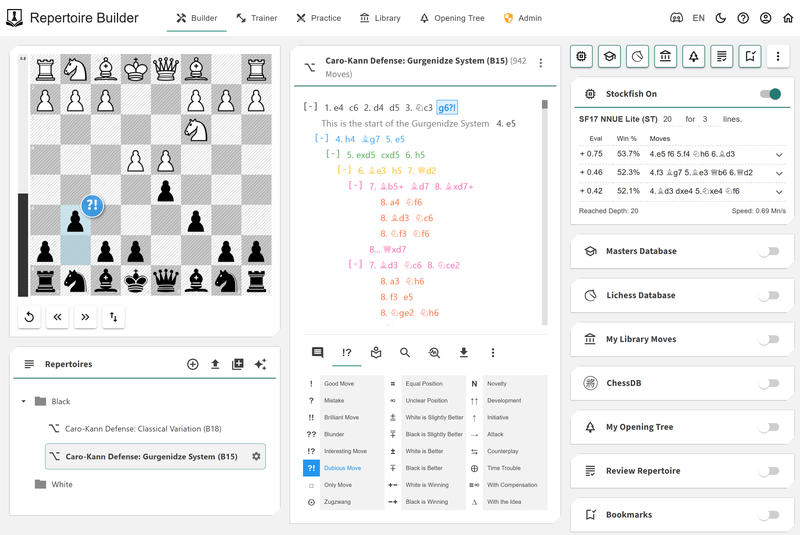
    image.png
    You can create multiple repertoires, each one acting like a separate file for your white and black opening lines. Whether you’re prepping for tournaments, training against specific opponents, or just exploring ideas — it’s flexible by design.
    The integrated chessboard lets you play through moves directly, while the Move Card gives you a clear view of your lines and variations. From there, you can add comments, annotations, and tags to help structure your thinking and keep things organized.
    To help you validate and improve your repertoire, I’ve added a suite of analytics cards, all tightly integrated into the Builder:

    • Stockfish Analysis
    • Lichess Masters Database
    • Lichess Players Database
    • ChessDB
    • Your Personal Library

    These let you cross-reference your lines with real-world data and engine evals — a great way to catch blunders, fill in gaps, or discover new ideas.
    Other features include:

    • Bookmarks — mark positions you want to come back to for deeper review
    • Transpositions — automatically detects and links equivalent positions across lines
    • Visualisations — see the structure and shape of your repertoire at a glance
    • Review Card — highlights weaknesses, shallow branches, and inconsistencies in your repertoire
    • The ability to run your entire repertoire through Stockfish for a full evaluation sweep
    • Tools to split repertoires into smaller chunks for targeted training or editing
    • Options to toggle between view modes depending on how you want to engage with your lines

    In short: the Builder brings together powerful tools and a smooth experience — everything you need to build, explore, and grow your repertoire in one place.

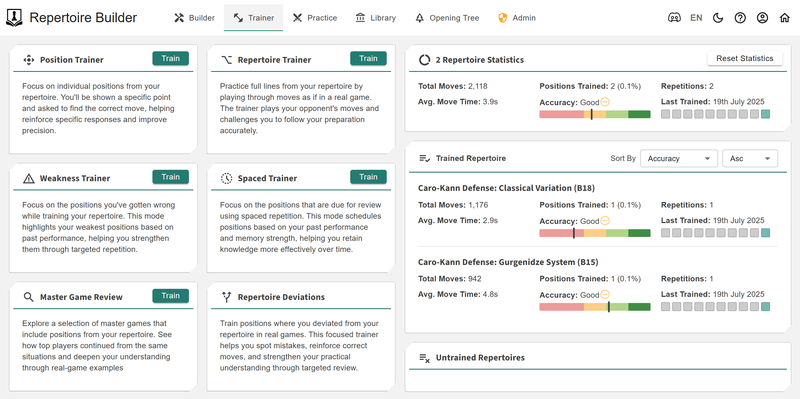
    Trainer Module

    Once you’ve built enough of your repertoire, it’s time to lock that knowledge in. That’s where Trainers come in — a set of focused tools designed to reinforce, challenge, and improve your memory of your lines.
    image.png
    Here’s what you’ve got:

    • Position Trainer
      This one picks a random position from your repertoire and throws it at you — no context, just: “What’s the move here?” It’s great for spotting whether you actually remember your prep in isolation, not just when playing through a full line.
    • Repertoire Trainer
      Play through your repertoire from the start — just like reviewing flashcards, but with moves instead of words. It helps you develop flow and recognize the structure of your lines move-by-move.
    • Weakness Trainer
      This focuses only on the positions you’ve struggled with. Whether you’ve made the wrong move or hesitated, it brings those weak spots back up for targeted review — so nothing slips through the cracks.
    • Spaced Trainer
      Powered by FRSR (Forgetting Rate Spaced Repetition), this trainer takes your performance across the other trainers and builds a schedule for optimal recall. It’s like Anki, but for your openings — making sure you’re revisiting lines just before you’re about to forget them.
    • Masters Game Review
      See how top-level players handled positions in your repertoire. This trainer grabs a random master game relevant to your lines, so you can study practical applications of your prep in real-world, high-level play.

    Each trainer has a specific role, but together they create a full training loop — helping you move from knowing your repertoire to owning it.

    Practice Module

    The Practice Module is where you put your repertoire knowledge into action.
    image.png
    You can practice against:

    • Stockfish
    • Masters Database
    • Lichess Database
    • ChessDB
    • Your Library
    • Your Opening Tree

    (Additional bots are in development and coming soon.)
    During practice, you can also view the candidate moves considered by your chosen opponent — giving you a sense of the alternatives they would have played.
    Once you’ve played through a game, quickly review it using analytics cards, or jump into the Library for full-scale analysis. You can enter Practice directly from the Builder or Library for a seamless experience.

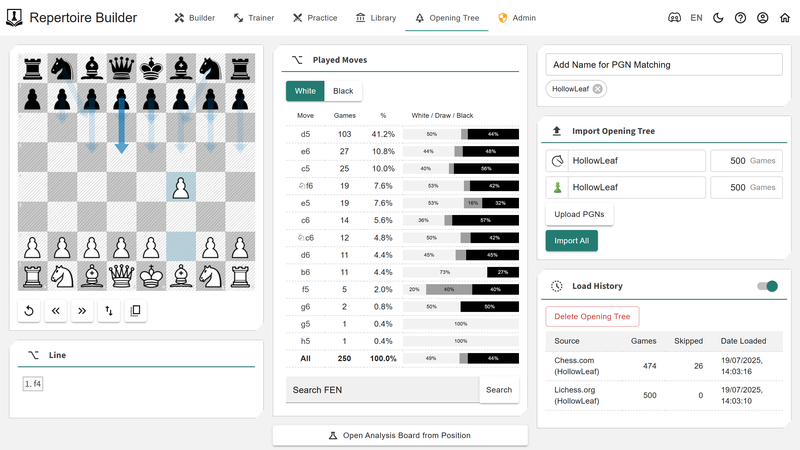
    Opening Tree Module

    image.png
    The Opening Tree Module lets you import and process games from:

    • Lichess
    • Chess.com
    • Custom PGNs

    The goal is simple: to build a detailed profile of your own games — whether they’re online blitz marathons or serious over-the-board battles — and compare them directly against your repertoire.
    It helps you spot gaps, overlaps, and patterns in your play, giving you real data to refine and reinforce your prep. Whether you’re checking what you actually play versus what you meant to play, or studying common responses, the Opening Tree gives you the full picture.

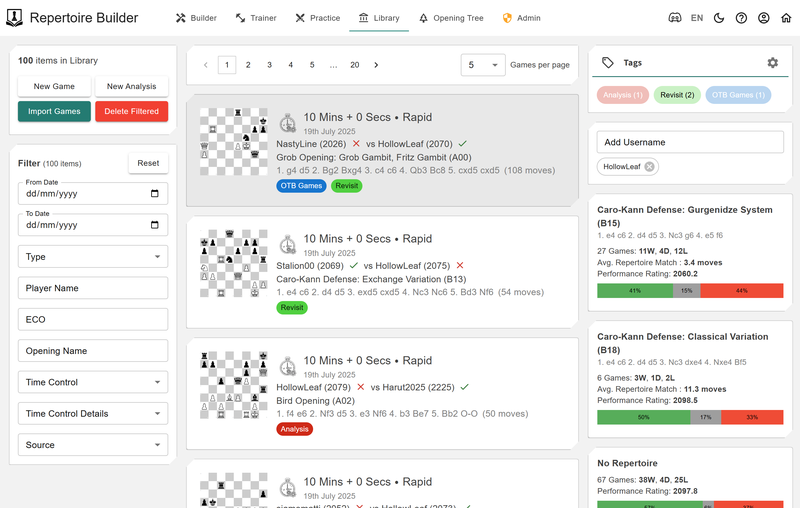
    Library Module

    The Library Module is your all-in-one analysis space.
    image.png
    You can import games from your practice sessions, online platforms, or PGNs — then filtertag, and view performance and statistics against your repertoire. It’s designed to help you spot patterns, track your progress, and stay organized as you study and improve.
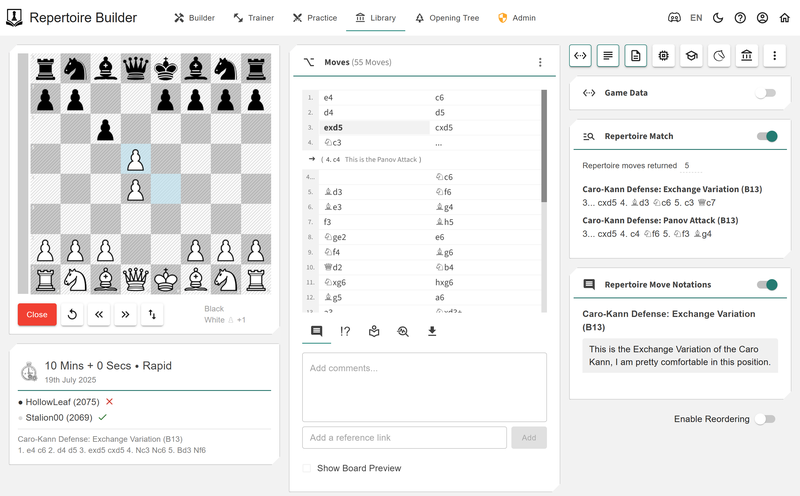
    image.png
    You get access to all the same powerful cards as in the Builder — so you can review your games with engine support, databases, and your own library of lines. You can also annotate your games by pulling in comments directly from your repertoire, and instantly compare your moves to the lines you’ve prepared.
    And when you’ve discovered something worth keeping? You can merge your analysis directly into your repertoires — closing the loop between study and preparation.

    And There’s More…

    As well as the core modules that support your repertoire building journey, the platform comes with a bunch of extra features to make the experience even smoother:

    • Import & Export Anytime
      Your repertoires and analysis are yours — bring them in or take them out. You’re never locked into the platform.
    • Mobile Responsive
      Use it anywhere, anytime. The interface works great on phones and tablets, so you can study and train on the go.
    • Multilingual Support
      The app is already translated into 12 languages, making it accessible to players around the world.
    • Light & Dark Mode
      Switch between themes based on your preference — or your eyes at 2AM.

    Final Thoughts

    Whether you’re just getting started with your openings or you’re deep into refining your repertoire, this platform was built to support the full journey — from building and training, to practicing, analyzing, and repeating the cycle.
    It’s the kind of tool I wish existed when I started — so I built it, piece by piece, with feedback from the community and a passion for chess and learning.
    And it’s still growing. I’ve got plenty of ideas in the pipeline, and the platform will continue to evolve with new features, improvements, and community-driven updates. It is, and will always be free to use with generous limits, and a future paid tier with additional functionality and increased limits.
    Special thanks to @FRahde and @mattchessic for their endless feedback, suggestions, and support throughout the journey — this project wouldn’t be the same without your input.
    If you’ve made it this far, thank you — now it’s your turn to explore it.

    Try it now, free: chessboardmagic.com/repertoirebuilder

    If you have any questions, feedback, or just want to hang out and talk chess, you can reach me via our Discord Server — I’m always around.

    This is just my first official release, and there will be plenty of more ideas coming down the road,

  • One Year of Chessboard Magic

    One Year of Chessboard Magic

    “A journey of a thousand miles begins with a single step.” – Lao Tzu

    In November 2020, after watching The Queen’s Gambit, I joined Chess.com, igniting a passion that led me to a 2000 rapid rating. Soon after, I moved to Lichess, where in early 2023, I achieved the rare quad 2000—reaching a 2000+ rating in Classical, Rapid, Blitz, and Bullet.
    By October 2023, I returned to programming after decades away, aiming to build a tool to analyze my opening mistakes with the goal of helping me improve. That spark grew into Chessboard Magic: a vibrant chess playground with 44 games, puzzles, and tools, crafted solo for a global community of players. What began as a personal project became a mission to make chess fun, educational, and accessible for all.

    Visit chessboardmagic.com

    The Journey

    This is a look back at the milestones that brought the platform to life, and the ideas that helped shape its path forward.

    May 2024 (v0.1) The Magic Begins

    Chessboard Magic debuted with five games: Guess the EloPlay the OpeningGuess the OpeningGuess the Eval, and Chess Slider. Designed to be fun, free, and intuitive, this lightweight playground tested my ideas and coding skills. Players loved the fresh approach, and their feedback fueled my momentum. Behind the scenes, I laid the foundation for a scalable platform.

    July 2024 (v0.2) The Alphabet of Chess

    Six weeks later, I released the Alphabet of Chess, adding word-based games like AnagramsHangman, and Wordsearch, plus Chess Quotes and a Glossary. New features like dark mode and time control filters enhanced the experience. With over 50,000 game plays, this update brought variety and personality, appealing to casual and serious players alike.

    August 2024 (v0.3) Explore Chess

    In August, I introduced analytics with User Scout and a revamped Notation Trainer, letting players explore Lichess profiles and practice notation. New games like Image Puzzle and Chess Crossword, plus a GIF Generator, added visual flair. The expanded Library included World Championship and Classic Games collections, marking a step toward serious training tools.

    September 2024 (v0.4) Opponent Prep and Library Expansion

    This update introduced the first version of the Opponent Prep tool, allowing players to compare two Lichess profiles and analyze their opening strengths and weaknesses. Alongside it came a redesigned homepage, an expanded Library with Chess Miniatures, the addition of a new Learn section featuring Chess Resources, and the launch of sharing functionality across the platform.

    October 2024 (v0.5) PWA, Languages, and Even More Games

    Chessboard Magic became a Progressive Web App, installable and offline-ready, with support for eight languages. New games like Hand and Brain and Guess Who, enriched the experience. With growing usage, I optimized performance to ensure reliability, setting the stage for sustainable growth.

    January 2025 (v0.6) Depth, Tools, and More

    The January update, with 139,000+ lines of code, introduced complex features like Where Are My Pieces?Chess CryptogramHidden Chess and a Tablebase tool. New languages (Hebrew, Japanese, Korean) joined backend upgrades, supporting 200 daily users. I also began experimenting with AI and gamification (XP, leaderboards), deepening the platform’s potential.

    February 2025 (v0.7) Chess Meets the Arcade

    February brought arcade-style games like Whack-A-Pawn and Jumping Knight, blending speed and nostalgia. I also launched Checkmate TrainerCoordinate Trainer, a mobile Chess Clock, and a “Free Promotion” feature to spotlight chess creators. A five-part tutorial series on building chess web apps shared my learning with the community.

    March & April 2025 – The Repertoire Builder Arrives

    From the beginning, Chessboard Magic was born out of a question I kept asking myself: Why do I keep making the same mistakes in the opening? While the early games and tools were playful and exploratory, they were also helping me build the skills—and the confidence—to finally return to that question with purpose.
    In March 2025, I released the Alpha version of the Repertoire Builder, the first tool on the platform designed to tackle chess improvement head-on. It wasn’t just about creating something functional; it was about creating something meaningful—a space where players could understand their openings, study smarter, and bridge the gap between theory and practice.
    By April, it was clear the idea resonated. Hundreds of players weren’t just trying the tool—they were returning, building, and refining. I launched the Beta version with that momentum in mind. My goal was no longer just to build a repertoire app—it was to create a deeply personal, reflective study environment, one that adapts to how you learn, highlights your weaknesses, and grows with you. It was the clearest step yet toward fulfilling the original purpose behind Chessboard Magic: to help players improve in ways that actually stick.

    Note: 2,000+ users have created an account on the platform so far, with over 650k moves added. It is free after all.

    May 2025 (v1.0)– One-Year Anniversary and New Tools

    To celebrate the first anniversary of Chessboard Magic, this release introduced several new tools, including the Piece TrainerOpening Templates (adapted from the Repertoire Builder), Memory Trainer, and the Space Visualizer, which highlights board control move-by-move. A major update was also made to User Scout to allow you to analyze games from both Lichess and Chess.com. This update also included several improvements across the platform (I found tons of little bugs when revamping the user interface), continuing the steady progress made over the past year (this has also been designed in the new template, which will be applied to all games and tools)

    Statistics

    Chessboard Magic has grown from five games and 5,000 lines of code to 44 tools, 20,000 users, and 350,000+ page views. Built solo with almost 200,000 lines of code, it’s a labor of love—crafted to make chess engaging, educational, and accessible for all.

    • Users: 20,000+ players worldwide
    • Page Views: 350,000+
    • Items: 44 unique games, puzzles, tools, and learning modules

    Looking Forward

    Chessboard Magic just turned one! What started as a handful of tools has grown into something much bigger — and this year, I’m aiming for a fun milestone:
    64 unique tools — one for every square on the board.
    Here’s what’s planned for the next 12 months:

    • Learning tools: Chess Principles, Chess Courses, Thematic Tactics, and Puzzles by Theme or Opening — all designed to strengthen your understanding and build solid foundations.
    • Analysis features: Opening Mistakes Analyzer, Game Review, Time Usage Analyzer, and Blunder Trainer — tools to turn your games into personalized feedback and insights.
    • Arcade-style games: Chess Pac-Man, Rook Racer, and Chess Crusher — fun, creative twists on chess to keep things playful and surprising.
    • Premium tools: Swiss Manager for tournaments, Club Manager for organizing communities, and Classroom for coaches and teachers.

    Have a feature idea or suggestion? I’d love to hear it — Chessboard Magic grows best with your input.

    Multiplayer Ideas
    I’m currently exploring ways to allow multiple people to play a game together on Chessboard Magic. Whether it’s cooperative modes, team play, or spectator features, this would be a fun and exciting challenge to implement—and could open up new interactive experiences for users.

    Summary

    What started as a simple side project—just five games and two tools with a few thousand lines of code—has grown into a platform with 44 tools20,000 users. Along the way, I’ve learned to code again, built an ecosystem from scratch, and connected with a passionate community of players who’ve shaped every feature through their feedback and ideas.
    As I look ahead to the next chapter of Chessboard Magic, the goal is as ambitious as it is symbolic: to reach 64 handcrafted applications, one for every square on the board. Whether you’re here to play, learn, analyze, or explore—I hope you’ve found something magical. And if you haven’t yet, I’m building toward it. Thank you for being a part of this journey.

  • Chess Repertoire Builder Beta Update

    Chess Repertoire Builder Beta Update

    “I hear and I forget, I see and I remember, I do and I understand.” – Confucius

    When I released the Repertoire Builder Alpha on March 28th, I had no idea what to expect. I was genuinely surprised when over 700 users logged in to explore the platform, and even more so by the thoughtful feedback and encouragement from the community. The comments, suggestions, and bug reports have been incredibly helpful in refining the experience, and thanks to that support, I’m excited to announce the launch of the Beta version.

    Start Building Your Repertoire Today!
    https://chessboardmagic.com/repertoirebuilder

    Since this is still a new platform and I’m carefully monitoring performance, feedback, and usage, the Beta will be limited to 3,000 total users

    Alpha Recap & Usage Stats – Thank You for the Incredible Support

    Before we dive into what’s new in the Beta, I wanted to take a moment to reflect on how far things have come since the initial release. The Alpha launch wasn’t just about testing infrastructure — it was about seeing whether this platform could genuinely help players study, build, and improve their openings.
    Here’s a quick recap of what the Alpha version included:

    • A clean and intuitive Repertoire Builder for creating and organizing multiple repertoires
    • Support for importing PGNs and Lichess Studies
    • A library of pre-built repertoire templates
    • The Repertoire Wizard to generate lines from any position
    • Stockfish move suggestions and full repertoire analysis
    • Master Games Database for model study
    • Interactive Position and Repertoire Trainers
    • Game import & comparison against your repertoire
    • Seamless PGN export to give you full control over your data

    With just a Lichess blog post and a few mentions elsewhere, I figured a handful of curious players might give it a try. Instead, I was blown away — not just by how many of you showed up, but by the thoughtful feedback, encouragement, and ideas that followed.
    Here’s what came out of the Alpha release:

    • 720 total users (yes, my user limiting system had a bug — so we accidentally sailed past the 500-user cap)
    • 998 repertoires created
    • 207,203 moves added
    • 7,864 user games imported

    When I launched the Alpha, my goals were simple: to validate the infrastructure and to see if this could actually become a useful tool for real chess players. I’m genuinely thrilled that so many of you not only gave it a shot — but kept coming back, building repertoires, training, and sharing feedback.
    Based on that momentum — and all the valuable feedback — here’s what’s new in the Beta release.

    Just a peek behind the curtain for the curious: the Repertoire Builder and its features – from building to training and analysis – are the result of over 40,000 lines of code and more than 300 hours of evening work.

    New Features

    I had a roadmap in mind when I first launched the Repertoire Builder, but honestly, many of the most impactful features came directly from your suggestions. So before anything else — a big thank you to everyone who took the time to share feedback, report bugs, and request features. Here are some of the key updates in the Beta version:

    Mobile-Friendly Experience – Train Anywhere

    The Repertoire Builder is now fully optimized for mobile devices. Whether you’re building lines on your phone or reviewing a variation during a tournament break, the layout adjusts seamlessly to smaller screens. Navigation, editing, and training have all been redesigned to ensure a smooth experience, no matter the device.

    Massive Training Update – Smarter Practice, Deeper Learning

    Training just got a major upgrade. The new Training Home gives you a central hub to track your progress with detailed stats like accuracyaverage response timedaily activity, and training memory scores. These metrics help you stay on top of your improvement journey by showing not just how much you’re training, but how well you’re retaining what you’ve learned.
    We’ve also introduced a powerful new system called Training Memory, a scoring model that evaluates every move you make — factoring in correctness, the number of mistakes, and how quickly you responded. This score is used to dynamically prioritize positions in both the Position Trainer and Repertoire Trainer, gently surfacing weak spots without making them feel repetitive or predictable. Over time, the system naturally adjusts to your strengths and weaknesses, helping you improve with focused, efficient practice.
    On top of that, we’re launching two brand new training modes:

    • Weakness Trainer: This mode targets the positions you’ve consistently gotten wrong, offering laser-focused practice to help you convert those problem areas into solid strengths. You’ll see your lowest-scoring positions from across all repertoires — just click and train.
    • Spaced Trainer: Based on the principles of spaced repetition, this trainer schedules positions for review at just the right time — not too soon, not too late. It uses a memory model (FSRS) to estimate when you’re most likely to forget a move and brings it up just before that happens. The result? You review less often but retain far more. This mode is ideal for long-term mastery — perfect for locking in your repertoire with minimal effort over time.
    • Master Game Review: Want to see how top players handle the positions in your repertoire? This mode selects real master games that match positions from your lines, letting you explore how elite players continued. It’s a great way to deepen your understanding and see your repertoire in action — played out on the biggest stage.

    A big thank you for Marcus Buffett of Chessbook for pointing me to the technology to implement Spaced Training.

    And inside the Repertoire Builder, you can now view your openings by Training Accuracy, making it incredibly easy to identify which lines need more work — or celebrate the ones you’ve mastered.
    This update is all about making your training smarter, more personalized, and more effective — whether you’re prepping for tournaments or just aiming to play better moves more often.

    Quality of Life Enhancements – Small Touches, Big Impact

    Alongside the major features, I’ve added a number of smaller improvements to make the overall experience smoother, more organized, and easier to navigate. Here are some of the key updates:

    • Repertoire Organization with Folders
      The Repertoire Card has been upgraded to support folders and nested repertoires. Whether you’re prepping for specific opponents or organizing by color or theme, your workspace can now match how you think about your openings.
    • Split Annotations into Categories
      Annotations are now more structured and meaningful. You can assign a single Move Category (like !! or ?!), a Position Evaluation (such as “White is better”), and multiple Observations (e.g. “Novelty”, “Counterplay”) — allowing for cleaner, more informative notes.
    • Improved Move Highlighting
      The selected move now has a clearer visual indicator, helping you stay oriented in complex lines or when moving quickly through variations.
    • Master Database Game Imports
      You can now bring in games from the Master Database directly into your repertoire, making it easier to learn from high-level play and integrate instructive examples into your study lines.
    • Recreated the Repertoire Templates with Stockfish Depth 20
      Repertoire templates were rebuilt from scratch using engine depth 20 for more accurate and better suggestions. The number of templates have been increased to 118.
    • Cosmetic Changes
      Made numerous small cosmetic tweaks across the platform to improve visual consistency, layout spacing, and overall polish.
    • Increased Limits
      Based on usage patterns and costs, I have increased the limits of the free tier to 5,000 moves, 10 repertoires and 100 imported games.

    Bug Fixes – Thank You for Helping Improve the Platform

    A huge thank you to everyone who used the platform and reported bugs or areas for improvement. Your feedback has been invaluable in making the app more stable and reliable. Here’s a breakdown of the fixes included in this Beta release:

    • Limited PGN import file size to 1MB to prevent issues caused by unusually large files — and to be fair, that’s already a pretty huge PGN.
    • Fixed an issue where editing user-imported games didn’t save correctly.
    • Fixed an issue where the rendering of arrows and square highlights was always from White’s perspective; they now correctly reflect the board orientation.
    • Fixed an issue where using the left and right arrow keys while typing in the comment box would navigate the board, which was disruptive; navigation is now disabled while entering comments.
    • Fixed connection stability issues — if a tab is left open for too long and becomes disconnected, the app now informs you so you’re not unknowingly working in an inactive session.

    Additionally, I’ve implemented various backend performance and infrastructure improvements for better reliability, and added internal monitoring tools to help track performance and diagnose issues more accurately.

    What’s Coming Next

    With the Beta now live, I’m shifting focus to the next wave of features and improvements. Some of these are already in motion, and others are part of the bigger roadmap for the full release. Here’s a preview of what’s ahead:

    • Redesign and Implement a Clean Transposition System
      I’m planning a deeper look into how the transposition system can be improved to make it more intuitive and give you greater control over how transpositions are represented. This new system will also be integrated into the wizard generators and templates for a more consistent and powerful repertoire-building experience.
    • Opponent Preparation Module
      One of the most exciting features in development. I already have tools for opponent prep on Chessboard Magic that compare two user accounts to find overlapping weaknesses. The goal now is to bring that functionality into the Repertoire Builder as a new module — allowing you to enter your opponent’s Lichess or Chess.com profile and instantly identify lines in your repertoire where you’re strong and they’re weak.
    • Search by Move, PGN, or FEN with Highlighting
      Quickly find specific positions or lines by typing a move sequence, pasting a PGN, or entering a FEN — with matches clearly highlighted.
    • Repertoire Management
      I am working on a powerful set of tools to give you full control over your repertoire structure. You’ll be able to import PGNs or individual games directly into existing repertoires. In addition, merge and split functionality will let you combine related repertoires or break them into smaller, more focused sections — making it easier than ever to manage and refine your openings as your preparation evolves.
    • Localisation and Multi-language Support
      I plan to bring full localisation to the Repertoire Builder — just like Chessboard Magic, which already supports 12 languages.
    • Enhance the User Game Import Experience
      Now that the Builder and Training systems have matured, I’ll be focusing on improving the user game import flow, adding smarter tools to connect your games and repertoire more meaningfully.
    • Update to Stockfish 17 – Upgrade the engine used for analysis and repertoire generation to leverage the latest evaluation improvements and strength enhancements from Stockfish 17.

    Your feedback will also heavily drive the next steps, so if there’s something you’d love to see or improve, don’t hesitate to reach out — this platform is being built with you, and for you.

    I didn’t plan on making this many updates so soon — as a parent of a two-year-old with multiple work commitments, I honestly wasn’t sure how much time I’d be able to dedicate. But your support, feedback, and encouragement have been incredibly energizing. It’s been amazing to see the community engage with something I’ve built, and I’m genuinely excited about where this platform is heading.

    If you haven’t tried the Repertoire Builder yet, now’s a great time to dive in and explore everything that’s new in Beta. And if you’ve already been using it — thank you. Your feedback and continued support have been the driving force behind this update.

    Start exploring here:
    https://chessboardmagic.com/repertoirebuilder

    Beta is currently limited to 3,000 total users, so if you’re interested, don’t wait too long to jump in. I’d love to hear your thoughts — feel free to send me a DM or join the conversation on Discord

  • New Chess Repertoire Builder

    New Chess Repertoire Builder

    “I hear and I forget, I see and I remember, I do and I understand.” – Confucius

    I started combining my passion for programming and chess in October 2023, which led to the creation of 36 different items—ranging from games to tools and resources—on Chessboard Magic. While I enjoyed building these, my ultimate goal was always to develop advanced applications that would truly benefit the chess community.
    As 2024 came to an end, I began brainstorming ideas for my first full-fledged chess application. I wanted to create something powerful, practical, and engaging—something that could genuinely help chess players improve. After careful planning, in January 2025, I officially started working on what would become my Chess Repertoire Builder, and today, I am happy to announce the Alpha release of my FREE Repertoire Builder!

    Start Building Your Repertoire Today!
    https://chessboardmagic.com/repertoirebuilder

    Note: For the Alpha Release, 500 spots will be available., and based on usage and costs, more spots will be made available at the end of April and May.

    Key Features of the Repertoire Builder (Alpha Release!)

    This initial release includes a powerful set of features designed to help chess players build, refine, and train their opening repertoires with ease. Whether you’re just starting to develop an opening strategy or looking to optimize an existing repertoire, this tool aims to give you everything you need.

    Repertoire Builder – Simple, Yet Powerful

    Managing your openings has never been easier. Create and organize multiple repertoires, whether for specific colors, tournament prep, or training different styles of play. Add moves with a simple click, include comments and annotations, and structure your repertoire in a clear, intuitive format. The move list allows for easy navigation, so you can quickly review and edit lines as your understanding grows.

    Import Your Games and Studies

    Instead of manually inputting your openings, you can import existing repertoires and games seamlessly. Whether you have a PGN file, want to paste a PGN, or pull your lines directly from a Lichess Study, the platform makes it easy to integrate and build upon your previous work.

    Repertoire Templates – Kickstart Your Openings

    Don’t know where to start? Choose from hundreds of pre-built repertoire templates, covering a wide range of openings from classical mainlines to aggressive gambits. These templates provide a solid foundation, allowing you to expand and customize your repertoire to fit your personal style.

    Repertoire Wizard – Quickly Generate a Repertoire

    Sometimes, you have a specific position or opening idea in mind but don’t know how to build around it. The Repertoire Wizard allows you to set up any position on the board and instantly generate an opening structure from that point forward. Whether you’re looking to expand an existing opening or experiment with new positions, this tool gives you a head start.

    Stockfish-Powered Move Suggestions

    Not sure which move to play? Use Stockfish, one of the strongest chess engines in the world, to evaluate positions and explore move options. This feature helps you identify strong candidate moves, compare different variations, and gain insights into engine-approved opening play—all within the repertoire builder.

    Master Games Database – Learn From the Best

    Studying the games of top players is one of the best ways to improve. With direct access to a Masters Database, you can quickly view historical and modern games played by grandmasters in your chosen openings. See which moves are most commonly played at the highest levels, understand key ideas, and integrate professional-level strategies into your repertoire.

    Full Repertoire Analysis – Evaluate Every Line

    With just a click, you can run Stockfish analysis on your entire repertoire, checking every move for accuracy and identifying weaknesses. This feature allows you to optimize your opening lines, ensuring that your preparation is backed by sound evaluations and free of major tactical flaws.

    Trainer Mode – Learn and Perfect Your Openings

    Building a repertoire is only half the battle—you need to commit it to memory. The Trainer Mode helps you actively reinforce your knowledge through two interactive training methods:

    • Position Trainer: A position is randomly selected from your repertoire, and you must play the correct move. This helps reinforce your understanding of key positions.
    • Repertoire Trainer: Play through your repertoire move by move while the system plays your expected opponent’s responses. This ensures you can confidently recall your lines in real games.

    Game Import & Analysis – Track Your Performance

    Understanding how your openings hold up in real games is crucial for improvement. You can import your own games from PGN files, pasted PGN text, or directly from Lichess and Chess.com. This allows you to analyze your past games within the same interface, making it easier to track mistakes, find improvements, and refine your repertoire accordingly.

    Automatic Repertoire Match – See Where You Deviate

    One of the most powerful features is the ability to automatically match your imported games against your repertoire. This shows you exactly where you followed your preparation and where you played something different. By reviewing these deviations, you can spot trends in your mistakes, reinforce your study habits, and refine your repertoire to better match your actual play.

    Export PGN – Full Control Over Your Data

    You are never tied to the platform. At any time, you can export your entire repertoire as a PGN file and use it wherever you want—whether for analysis in another tool, sharing with a coach, or importing into another chess platform. Your repertoire is yours to manage, and you always have full control over your data.

    This alpha release is just the beginning. I’ll be actively improving and expanding the platform based on community feedback. Whether you’re a club player, tournament competitor, or serious chess enthusiast, this tool is designed to help take your opening preparation to the next level.

    Free Tier & Future Plans

    I am launching the Alpha release with a free tier that includes the following limits:

    • 10 Repertoires
    • 2,000 Moves
    • 100 Imported Games

    These limits are in place as I assess usage patterns and server costs. My goal is to keep the tool free for as many as possible, and I will evaluate these limits over time. As the platform grows, I am planning to introduce a higher-limit paid service to help cover operational costs while ensuring the tool remains accessible to everyone.

    Disclaimer

    This is an Alpha release, meaning the platform is still in its early stages of development. While I will do my best to ensure stability, there may be changes, updates, and improvements along the way—hopefully without breaking anything, but please keep this in mind as you use the tool.
    I truly appreciate your patience and feedback during this phase. Your insights will help shape the future of the Repertoire Builder and ensure it becomes a powerful tool for the chess community.

    In Progress

    These features are currently in progress and focused on making the Repertoire Builder faster, smarter, and easier to use — helping you build and train more effectively than ever.

    Spaced Trainer for your Repertoire

    A smarter training system using spaced repetition to help you internalize your lines more effectively over time. Rather than brute-force memorization, this method ensures you practice the right lines at the right time, boosting long-term retention and performance over the board.

    Search Functionality

    I believe the ability to search within your repertoire will be a powerful addition. Whether you’re looking for a specific line, move, or variation, being able to instantly jump to that point would greatly improve navigation and workflow — especially as repertoires grow in size. I am still exploring the best approach to implement this effectively and am definitely open to suggestions.

    Build From Here

    I plan to integrate the Repertoire Wizard directly into the Moves Card. This means you’ll be able to click on any move and ask the app to generate a move tree from that position using Stockfish. It will make building deep and logical repertoires much faster without needing to manually consult the engine each time.

    Offline Mode

    I also want to support offline editing. This will allow you to work on your repertoire without needing an internet connection, and the app will automatically sync your changes once you’re back online — keeping everything seamless and uninterrupted.

    Mobile Support

    Currently, the Repertoire Builder is designed for desktop use. Once I feel the core functionality is stable, I will begin optimizing the interface and interactions for mobile devices so you can build, view, and train on the go.

    Increased Limits

    Since this is a non-profit project, I want to strike the right balance between fair access and sustainable costs. I will continue monitoring usage and server load to ensure that limits are reasonable and that paid tiers (if introduced) remain affordable and inclusive.

    Increased Templates

    At the moment, the template selection is limited. I want to offer a much wider range of repertoire templates for different styles, openings, and levels of experience. This should make it easier for new users to get started and explore openings they may not be familiar with.

    Annotated Templates

    I aim to provide detailed commentary and insights for each line in selected templates. These annotations will explain why certain moves are played and help users understand the ideas behind the lines. While I am not a titled player, I will do my best to provide value, and I would love to feature community-contributed annotations as well.

    Repertoire Sharing

    The current flag icons are just placeholders. My goal is to allow users to publish their repertoires, making them publicly accessible and sharable. Others will be able to view, copy, and import these repertoires into their own workspace — even without an account — enabling community-driven learning.

    Integrate Chessboard Magic Games

    I am working to bring over additional tools like User Scout and Opponent Prep into the builder experience. The goal is to create a complete ecosystem where you can prepare, train, and explore all in one place — making it more than just a repertoire app.

    Localisation

    The rest of Chessboard Magic already supports 12 different languages, and I want the Repertoire Builder to reflect that same global accessibility. Multilingual support will allow players from all backgrounds to learn and train in their preferred language.

    I hope you find this tool useful, and I’m excited to see how it helps you improve your opening preparation. After a short break, I’ll be gearing up to work on the next release, bringing even more features and improvements based on your feedback.
    Your thoughts, suggestions, and ideas are incredibly valuable to me! If you have any feedback or feature requests, I’d love to hear from you. Feel free to reach out on Discord, drop a comment on this blog, or send me a DM.

    Thank you for your support, and happy studying!

  • Chessboard Magic: Feb 2025 Update

    Chessboard Magic: Feb 2025 Update

    Introducing a fun new way to enjoy chess: Classic Arcade games with a chess twist!

    Welcome to the February 2025 update for Chessboard Magic! This release introduces a new category of classic arcade games with a unique chess twist. These games take the nostalgic gameplay you know and love—fast-paced mazes, puzzles, and more—and reimagine them with chess-inspired elements to bring a fresh perspective to the classics.
    Whether you grew up playing these timeless arcade hits or are discovering them for the first time, their blend of strategy, fun, and nostalgia is sure to captivate players of all ages. Stay tuned as we continue to expand the magic of Chessboard Magic!

    Join us here: Chessboard Magic Discord
    Visit chessboardmagic.com

    Updates

    This past year has been full of exciting changes and improvements on Chessboard Magic. I’ve been hard at work creating new games, updating existing ones, and adding useful tools that make the platform more robust and fun for all chess lovers. In this update, you’ll find a mix of new features, game improvements, and behind-the-scenes optimizations that will make the site even more enjoyable.

    • (New Game) Whack A Pawn this fast-paced game challenges your reflexes and strategy as pawns pop up from their squares on the board, daring you to tap and “whack” them back before time runs out. Designed for players of all ages and skill levels, Whack A Pawn combines vibrant visuals, engaging sound effects, and increasingly challenging levels to keep you on your toes.
    • (New Game) Jumping Knight a twist on the classic Flappy Bird concept with a chess-inspired flair! Guide a nimble knight through an endless chessboard, leaping over obstacles and collecting points. With vibrant visuals, engaging gameplay, and challenges for all skill levels, it’s endless fun!
    • (Learning) Checkmate Trainer practice classic checkmating patterns in a fun, interactive chess game designed for all skill levels. Play against an engine, sharpen your strategies, and improve your endgame skills with vibrant visuals and engaging, hands-on practice
    • (Learning) Coordinate Trainer learn and master chessboard coordinates through fun, interactive challenges designed for all skill levels. Perfect your spatial awareness and board mastery with engaging visuals and dynamic gameplay, making learning both effective and enjoyable!
    • (Tool) Chess Clock The Chessboard Clock app brings the functionality of DGT clocks directly to your mobile phone. Designed for convenience and accuracy, it replicates the classic chess clock experience with customizable time controls, intuitive touch controls, and a sleek, user-friendly interface. Perfect for games on the go!
    • Performance Optimization – With the growing number of players (averaging around 150 users per day), I’ve worked on optimizing performance and upgrading the backend infrastructure to handle the increased traffic. This means a smoother, faster experience for everyone!
    • Bug Fixes & Usability Improvements – Of course, no update would be complete without several bug fixes and improvements to make the site more enjoyable and user-friendly. Thank you to everyone who reported issues—I couldn’t have done it without your help!
    • Added Free Promotion – This will be used to provide free promotion to chess content creators or resources. Message me if you want to be included or know of other resources that should get some extra exposure.

    Programming Chess Web Applications

    Creating chess web applications has been an incredibly fun and rewarding journey, and I want to share that experience with you! That’s why I’ve put together a five-part series to help you program your own chess web app from scratch. Whether you’re a seasoned developer or just starting out, this series covers all the essentials to get you up and running.
    Here’s what’s included in the series:

    • Part 1: Getting Started – Dive into the basics of web development as we install the necessary tools and set up your first chess web application. You’ll learn how to create a solid foundation for your project and get comfortable with the development environment.
    • Part 2: Integrating Stockfish for Analysis – Take your app to the next level by integrating Stockfish, one of the world’s strongest chess engines. Learn how to add powerful analysis capabilities to make your application truly interactive and insightful.
    • Part 3: Deploying Your Chess Web Application – Once your app is functional, it’s time to share it with the world! This guide will walk you through deploying your application to a live server so anyone can access and enjoy it.
    • Part 4: Customisation of Your Chessboard – Stand out by giving your chessboard a distinct look and feel. This section will teach you how to modify the visual aspects of your board, from colors and styles to animations and themes.
    • Part 5: Creating a Basic Game Review – Build a game review web application that lets users analyze their moves, explore variations, and learn from their mistakes. This step combines functionality and user engagement to create a complete chess experience.

    If you haven’t read these yet, do check them out!

    Coming Soon

    I am happy to announce that even more chess-themed Arcade games are on their way! These upcoming games are inspired by beloved gaming genres, now reimagined with a unique chess twist. Here’s a sneak peek:

    • Rook Runner: An endless runner where you dodge obstacles, collect bonuses, and aim for the highest score.
    • Pawn Breaker: A brick-breaking game where you bounce a piece to smash blocks and unlock new levels.
    • King Hunt: A Pac-Man-style maze game where you navigate a grid, collecting items and avoiding enemies.
    • Chess Crusher: A Candy Crush-style puzzle game where you match and clear pieces to complete challenging levels.

    I am also planning to develop the following chess applications:

    • Repertoire Builder: This will allow chess players to prepare their openings with comments, explore variations using an engine, and compare their played games against their repertoire. Users can make their repertoires public and connect their Lichess or Chess.com accounts for deeper analysis
    • Opening Analyzer: A tool designed to pinpoint inaccuracies in the opening phase of a game, providing players with insights into how to build a solid foundation right from the start.
    • Game Review Tool: A feature that allows players to analyze their games move by move, highlighting mistakes, blunders, and missed opportunities to help them improve their play.
    • Chess Principles Integration: A new addition to the Learn section that will teach key chess principles, such as control of the center, piece activity, and king safety, to help players understand and apply these concepts in their games.

    The next release will be on our 1 year anniversary on the Tuesday 27th May 2025, yes, it has only been one year since my initial release with 5 games.

    Full Catalogue of Chessboard Magic

    Here’s the latest update on Chessboard Magic—now featuring an impressive 39 unique items! With a goal of reaching 64, just 25 more items to go. I’m excited to keep pushing forward and make it happen!
    Games (17):

    Analytics (2):

    Learn (7):

    Library (7):

    Tools (6):

    Thank You

    I just want to take a moment to say thank you from the bottom of my heart. Since our launch on May 27, 2024, we’ve come so far together, and this is only our sixth release. I’m incredibly grateful for all of your support, suggestions, and feedback—it has truly helped shape Chessboard Magic into what it is today.
    Every time you share the site with a friend or leave a comment, it means the world to me. I’m committed to making Chessboard Magic even better, and I’m excited about what’s to come. Stay tuned for more updates, and as always, happy chess playing!
  • Building My Next Chess Application: A Repertoire Builder

    Building My Next Chess Application: A Repertoire Builder

    I have been programming for about a year now, and I’m pretty happy with the number of games and tools I’ve built on Chessboard Magic. It has been an exciting journey filled with challenges, learning, and growth. However, as I reflect on why I started this journey, I realize it was to create tools to support my own personal chess improvement.

    With that in mind, I want to get back to the original purpose of developing analytical tools that help me and others grow as chess players. My next major project is a Repertoire Builder, a tool that I hope will provide immense value to players of all levels, but particularly to beginners like myself who are navigating the complex world of chess openings and strategies.

    Why Build This?

    For those unfamiliar, a repertoire builder is a tool that helps you prepare and organize your opening strategies. It allows you to build a collection of openings and their variations, giving you a structured way to approach the game from the very first move. The idea is to develop confidence and consistency in the openings you play while understanding the ideas behind them.
    Currently, I have my repertoire scattered across platforms like Chessbase and Lichess, but as a beginner, I often feel these tools don’t help me as much as they could. They tend to cater to more advanced players or are designed without enough focus on actionable learning. While there are other platforms that offer repertoire-building features, I aim to create a free, beginner-friendly tool tailored to my needs and, hopefully, the needs of others seeking to improve their chess skills.

    Planned Features

    Here are some key features I’m envisioning for the Repertoire Builder:

    1. Effortless Repertoire Creation:
      • Build your repertoire directly on a chessboard with an intuitive interface that allows you to input moves and variations seamlessly. The design will prioritize clarity and usability, making it accessible even to beginners.
      • Import PGN files to quickly upload existing repertoires, enabling users to consolidate work from multiple sources without starting from scratch.
      • Connect to your Lichess or Chess.com accounts to import your games and identify recurring patterns, giving insights into your existing play style.
      • Import directly from Lichess Studies, allowing you to seamlessly integrate your organized analysis and enrich your repertoire with pre-analyzed content.
    2. Repertoire Trainer:
      • Train your repertoire by practicing positions pulled directly from your repertoire database. Whether you have a minute or an hour, the trainer will adapt to your schedule and needs.
      • The tool will quiz you on the top moves for each position, ensuring you build muscle memory and confidence in your openings. Positions will be randomized to keep training sessions dynamic and challenging.
      • After each attempt, receive detailed feedback, including suggested improvements, alternative moves, and access to any personal comments you’ve added to the position. This feedback loop ensures steady progress.
      • The trainer will be mobile-friendly, so you can practice your repertoire on the go, ensuring continuous improvement even during busy days.
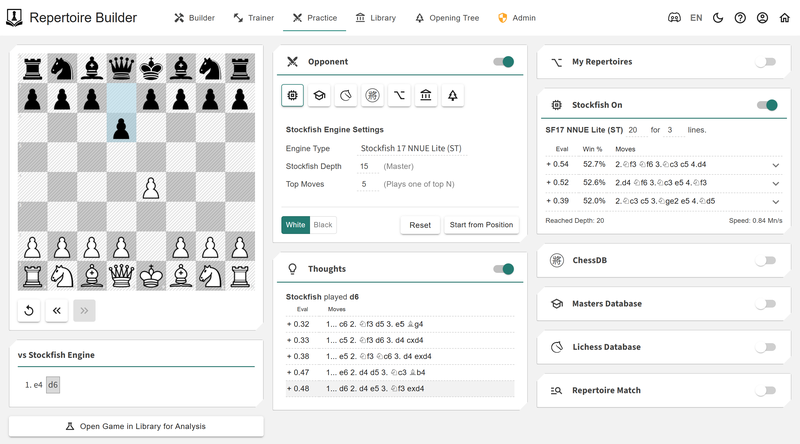
    3. Play Against an Engine:
      • Test your repertoire by playing against a powerful engine with customizable difficulty settings to mimic a variety of playing styles and strengths.
      • Start from specific positions in your repertoire to simulate real-game scenarios and refine your responses under practical conditions.
      • After each practice game, access in-depth analysis of the outcomes, highlighting strengths, weaknesses, and areas for improvement.
    4. Repertoire Analyzer:
      • Compare your games against your repertoire to assess how well you are adhering to your prepared lines during actual play. This comparison will include move accuracy and alignment with your opening plans.
      • Use advanced analytics to identify your strengths and weaknesses, helping you prioritize areas that need the most attention.
      • Highlight gaps or missing lines in your repertoire to ensure you’re prepared for a wide range of responses from opponents, leaving no surprises on the board.
      • Detect inaccuracies or mistakes within the first 10-15 moves of your games, offering tailored recommendations to help you correct and strengthen your play.
    5. Shareable Repertoires:
      • Make your repertoire (or specific chapters of it) public or private based on your preference, giving you control over how much you share.
      • Share your opening repertoire with others in the chess community, fostering collaboration and encouraging knowledge exchange.
      • Include social features such as comments, likes, or discussion boards, enabling players to engage with others who have similar opening interests.

    Timelines

    I’ve already started doing some light programming on this project, and progress has been steady.
    image.png
    Since I’m balancing this with other responsibilities, the development will proceed at my own pace. However, I am targeting a draft release in May 2025. This will allow me to refine the features and gather initial feedback to ensure the tool meets the needs of the chess community.

    Feedback

    I’m still in the early stages of designing this tool, and I would love to hear your thoughts! What features would you find most useful in a Repertoire Builder, regardless of your skill level? Is there anything you’d like to see that I haven’t mentioned? Your input would help shape this project into a tool that truly benefits the chess community, from beginners seeking a structured approach to seasoned players exploring new variations.

    Feel free to share your ideas in the comments section or join the conversation in my Discord serverhttps://discord.gg/c82jQuy9AM.
    Let’s collaborate to create something amazing together!

    Kind Regards,
    Toan Hoang (@HollowLeaf)
    Creator of Chessboard Magic